
Hosted by site sponsor WebMate.
Aluminum iMac Q&A - Updated November 4, 2011
To be notified of new Q&As, sign up for EveryMac.com's bimonthly email list.
How does the "ultra thin" keyboard provided with the Aluminum iMac models compare to a more traditional desktop keyboard? How does it feel?
Apple has promoted the keyboard that ships with the Aluminum iMac models with:
Its ultrathin anodized aluminum enclosure features low-profile keys that provide a crisp, responsive feel. The keyboard includes special function keys for one-touch control of Mac features, and two USB 2.0 ports for high-speed connectivity to your iPod, Mighty Mouse, digital camera, and other devices.
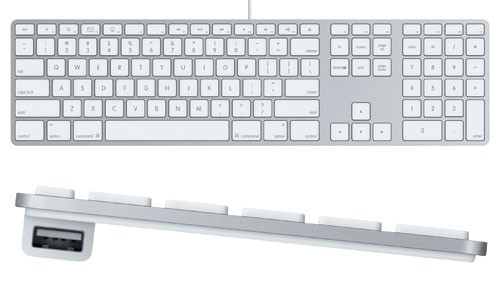
Photo Credit: Apple, Inc.
The above keyboard shipped by default with the "original/Mid-2007" and the "Early 2008/Penryn" models. For the "Early 2009" Aluminum iMac models, by default, the systems shipped with a smaller keyboard without the numeric keypad (below), but the larger full size keyboard was offered as a no cost upgrade.
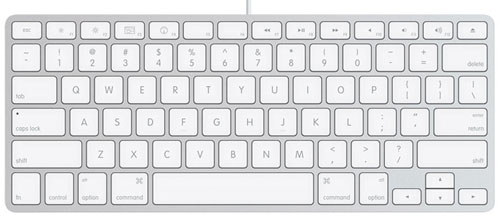
Photo Credit: Apple, Inc.
The "Late 2009" models shipped by default with a wireless version of the smaller keyboard below but could be configured with the same small wired keyboard that shipped with the "Early 2009" models or the full size wired keyboard with numeric keypad for no extra charge. The current "Mid-2011" and discontinued "Mid-2010" models are, or were, offered with the same small Apple Wireless Keyboard by default and can be configured with the full size wired keyboard with numeric keypad for the same price (but not the smaller wired keyboard). The current, but education-only "Late 2011" model is offered with the same small Apple Wireless Keyboard, too.
These keyboards are a mere 0.33 inches at the front edge, which is truly "ultra thin" by just about anyone's definition. The wired keyboards feature USB 2.0 ports -- rather than the earlier and slower USB 1.1 standard -- and also were the first Apple keyboard to feature the word "command" on the command keys. The wireless keyboard does not have USB ports.
The command keys lack the Apple logo, which no doubt drew some gasps from the Apple faithful, but the original Macintosh keyboard also lacks the Apple logo. Prior to the "Late 2009" models introduced October 20, 2009, these keyboards were bundled with a white Apple Mighty Mouse, but the "Late 2009" and "Mid-2010" systems shipped, by default, with a wireless "Magic Mouse", where the "entire top is a seamless multi-touch surface" that allows one to "navigate using intuitive finger gestures". For an additional US$69, the "Mid-2010" models also could be configured with a "Magic Trackpad" that provides multi-touch input like on a recent Apple notebook.
The current "Mid-2011" models, on the other hand, can be configured with either a "Magic Mouse" or a "Magic Trackpad" at no extra charge (or both for an extra US$69). In a particularly misery "downgrade," the education-only "Late 2011" iMac ships with a less capable -- non-magical -- Apple Mouse.
For photos comparing the "ultra thin" Aluminum Apple keyboard to earlier Apple keyboards as well as a handful of third-party options -- as first spotted by the DaringFireball blog -- you may wish to review an archive of a collection originally posted by Blake Patterson.
Reviewer Opinions
On basic terms, the "new ultra thin" keyboard provided with the Aluminum iMac models effectively is a desktop version of the keyboard first introduced with the MacBook line (and the smaller ones effectively are the MacBook keyboard). Just as with the MacBook keyboard, opinions regarding the feel and usability of the keyboard are decidedly mixed.
A PC World reviewer did not particularly care for the keyboard:
Unfortunately, the ports are inset, one on each side at the rear of the keyboard; and the keyboard itself is so low-slung that only one out of six flash memory drives I tried -- each in a different case -- actually fit the USB port without affecting the keyboard's balance. The keyboard's low profile hindered my typing, too. [Note that the wireless keyboard does not have USB ports.]
Although he initially was worried, ArsTechnica's Eric Bangeman found:
I felt like my typing accuracy suffered a bit at first. The keys are flat -- or nearly so -- instead of convex, so it just felt . . . different at the outset. Like the glossy monitor, however, I was able to forget about the keyboard after a good five minutes of use. I also had Mrs. Bangeman spend some time using it, and her experience matched mine: it initially felt weird, but that feeling vanished after a short time.
MacWorld, on the other hand, went as far as to say that:
In some ways, I think the keyboard design is more of a triumph than the iMac itself (and for [US]$49, you can add it to an existing Mac as well), and I highly suggest giving it a chance before writing it off as being too different.
Keyboard Summary
Ultimately, you are the only one who can decide whether or not you like any of the keyboards provided by the Aluminum iMac models. If you have doubts, you may wish to try one out in person. If you do not care for the standard keyboard, MacWorld has numerous reviews of alternate keyboard choices in a variety of price ranges that should make it easy to locate the perfect keyboard for you.
In the US, site sponsor Adorama sells new iMac models with free shipping. Other World Computing and JemJem sell used and refurb iMac models at bargain prices with free shipping, as well. Finally, if you need to sell an iMac, A+ BBB-rated Cash for Your Mac will buy your older iMac with an instant quote and prompt payment.
In the UK, site sponsor Hoxton Macs sells used iMac models with a one-year warranty and free next day delivery throughout the UK. Delivery across Europe also is available starting at just £9.99 for two-day delivery to France and Germany.
In Australia, site sponsor Mac City likewise has a variety of used iMac models sold at low prices and available with a free warranty and fast shipping across Australia.
Permalink | Report an Error/Typo | Sign Up for Site Update Notices
Established in 1996, EveryMac.com has been created by experts with decades of experience with Apple hardware. EveryMac.com includes, and always has included, original research incorporating detailed, hands-on inspection of packaging, computers, and devices as well as extensive real-world use. All information is provided in good faith, but no website or person is perfect. Accordingly, EveryMac.com is provided "as is" without warranty of any kind whatsoever. EveryMac.com, and the authors thereof, shall not be held responsible or liable, under any circumstances, for any damages resulting from the use or inability to use the information within. For complete disclaimer and copyright information please read and understand the Terms of Use and the Privacy Policy before using EveryMac.com. Copying, scraping, or use of any content without expressed permission is not allowed, although links to any page are welcomed and appreciated.