
Hosted by site sponsor WebMate.
Silver Tower Mac Pro (Dual Optical) Q&A - Revised September 17, 2010
All Mac Q&As >> Silver Tower Mac Pro Dual Optical Q&A (Home)
To be notified of new Q&As, sign up for EveryMac.com's bimonthly email list.
How does the original Mac Pro allocate lanes for the PCIe bus? What configurations are possible?
The Power Macintosh G5 Quad 2.5 has a four slot PCI Express bus with a fixed total of 32 lanes (with a 16-lane, 4-lane, 8-lane, and 4-lane slot) and the subsequently introduced Mac Pro "Eight Core" 2.8 (Early 2008) has a fixed total of 40 lanes (with a double-wide 16-lane PCIe 2.0 slot, single-wide 16-lane PCIe 2.0 slot, and two 4-lane PCIe slots).
The original Mac Pro Quad 2.66, on the other hand, has a four slot PCI Express bus with a total of 26 dynamically allocated lanes. By default, the graphics card occupies a double-wide 16-lane PCI Express slot, the second slot is allocated as a single lane, and the third and fourth slot are each configured as 4-lane slots.
Apple's PCI Developer's Note provides this helpful diagram of the default configuration:
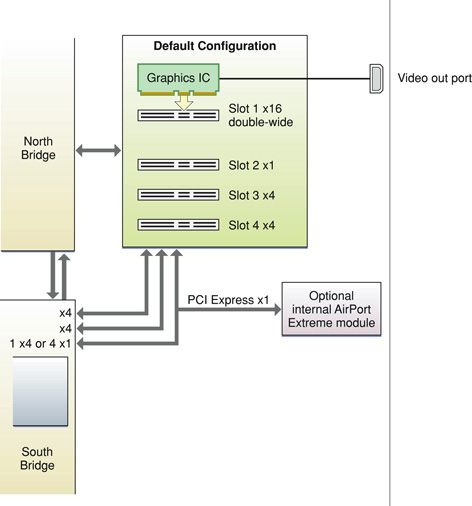
However, if you install an additional PCI Express card and restart the Mac Pro, MacOS X will provide several options for allocating the lanes.
As provided by Apple's technical document, the remaining lane allocation options are:
| Slot 1 | Slot 2 | Slot 3 | Slot 4 | |
| Option 1 | 8-lanes | 8-lanes | 1-lane | 8-lanes |
| Option 2 | 8-lanes | 8-lanes | 4-lanes | 4-lanes |
| Option 3 | 16-lanes | 1-lane | 1-lane | 8-lanes |
So, if you install a second graphics card in slot four, it would be best to configure the PCIe slots in the 16/1/1/8 configuration to maximize bandwidth. If you need to install a third graphics card or another PCIe card that requires more than a single-lane slot, you will be forced to reconfigure the slots as 8/8/1/8, dropping the amount of available bandwidth to the first graphics card from 16-lanes to 8.
Also see: How many PCI slots of what type are provided by the Mac Pro models? How do you add another PCI card?
Permalink | Report an Error/Typo | Sign Up for Site Update Notices
<< Mac Pro Dual Optical Drives Q&A (Main) | All Mac Q&As
Established in 1996, EveryMac.com has been created by experts with decades of experience with Apple hardware. EveryMac.com includes, and always has included, original research incorporating detailed, hands-on inspection of packaging, computers, and devices as well as extensive real-world use. All information is provided in good faith, but no website or person is perfect. Accordingly, EveryMac.com is provided "as is" without warranty of any kind whatsoever. EveryMac.com, and the authors thereof, shall not be held responsible or liable, under any circumstances, for any damages resulting from the use or inability to use the information within. For complete disclaimer and copyright information please read and understand the Terms of Use and the Privacy Policy before using EveryMac.com. Copying, scraping, or use of any content without expressed permission is not allowed, although links to any page are welcomed and appreciated.