
Hosted by site sponsor WebMate.
Mac Studio Q&A
Published September 30, 2026
All Mac Q&As >> Mac Studio Q&A (Home)
To be notified of new Q&As, sign up for EveryMac.com's bimonthly email list.
What are all the differences between the Mac Studio "M5 Max/M5 Ultra" (2026) models? Which is best for me? Which is actually faster?
As documented by EveryMac.com, there are four 2026 Mac Studio models -- the entry-level Mac Studio "M5 Max" 18 CPU/32 GPU and "M5 Max" 18 CPU/40 GPU -- and the high-end Mac Studio "M5 Ultra" 30 CPU/64 GPU and "M5 Ultra" 36 CPU/80 GPU.
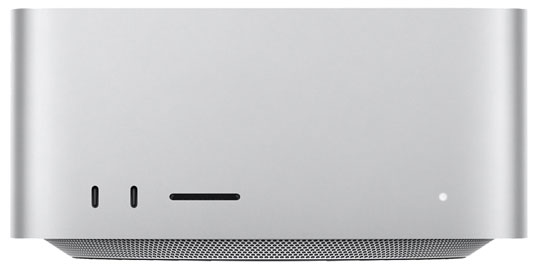
Photo Credit: Apple, Inc. (Mac Studio - Front)
Although these models look the same, there are significant external and internal differences between the Mac Studio M5 Max and Mac Studio M5 Ultra.
External Differences
The Mac Studio M5 Max and M5 Ultra share the same cuboid case -- 3.7 inches tall and 7.7 inches wide and 7.7 deep. However, the M5 Ultra is two pounds heavier -- 8.0 pounds rather than 6.0 pounds -- because the higher performance and higher heat M5 Ultra uses a heavier copper heatsink for cooling whereas the entry-level M5 Max uses a lighter weight aluminum one.
Connectivity Differences
Connectivity is a significant difference between the Mac Studio M5 Max and M5 Ultra.
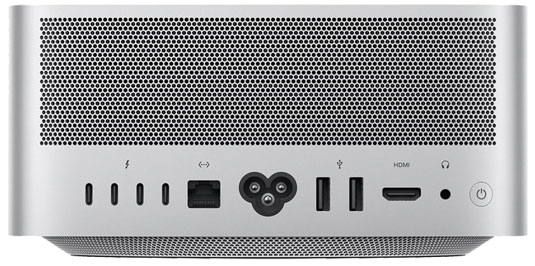
Photo Credit: Apple, Inc. (Mac Studio - Rear Ports)
The Mac Studio M5 Max and M5 Ultra have the same rear ports -- four Thunderbolt 5 ports (Up to 120 Gb/s; USB-C shaped connector), two USB-A ports, an HDMI port, a 10-Gigabit Ethernet port, and a 3.5 mm headphone jack. Both also support 802.11be (Wi-Fi 7) and Bluetooth 6.
However, the entry-level Mac Studio M5 Max models support as many as five displays "over any combination of" the Thunderbolt 5 ports and the HDMI 2.1 port. This includes four displays up to 6K at 60 Hz or 4K at 165 Hz over Thunderbolt in addition to a fifth display with up to 5K at 60 Hz over HDMI. Alternately, it can support two displays up to a native resolution of 8K at 60 Hz or 5K at 120 Hz or 4K at 240 Hz over Thunderbolt, plus a third display up to 5K at 60 Hz over HDMI.
The high-end Mac Studio M5 Ultra models go even further. They support as many as eight displays "over any combination of" the Thunderbolt 5 ports and the HDMI 2.1 port. This includes eight displays up to 6K at 60 Hz or 4K at 165 Hz. Alternately, it can support four displays up to 8K at 60 Hz or 5K at 120 Hz or 4K at 240 Hz.
On the front, both the Mac Studio M5 Max and M5 Ultra include the same SDXC (UHS-II) card slot, but the unlabeled ports are different. The entry-level Mac Studio M5 Max has two USB-C ports (up to 10 Gb/s) whereas the high-end Mac Studio M5 Ultra has two much faster Thunderbolt 5 ports (up to 120 Gb/s).
Identification Differences
As diligently hand documented by EveryMac.com from the hardware itself, the 2026 Mac Studio models have both unique Model Numbers and EMC Numbers on the hardware itself as well as different Model Identifiers in software.
In recent years, the Model Number and EMC Number have not been shared by later models, but shared identifiers between years always could be a possibility. In general, the Model Identifier is a more specific, long-term way to differentiate between these systems:
| Mac Studio | Model No. | EMC No. | Model ID |
| M5 Max | A3545 | 9029 | Mac17,14 |
| M5 Ultra | A3546 | 9098 | Mac17,15 |
EveryMac.com's Ultimate Mac Lookup feature can identify these models by other identifiers, as well.
More information about specific identifiers is provided in EveryMac.com's extensive Mac Identification section.
Internal Differences
Internally, are the most major differences between the entry-level Mac Studio M5 Max and M5 Ultra. Both models use highly similar internal designs, but there are a variety of different components.
The entry-level M5 Max models use an 18-Core CPU, have 32-Core or 40-Core GPUs, a 16-Core Neural Engine, 460 GB/s of memory bandwidth, and an aluminum heatsink. By default, they ship with 36 GB of RAM (configurable with 48 GB, 64 GB, or 128 GB only at the time of purchase) and 512 GB of SSD storage (configurable with 1 TB, 2 TB, 4 TB, or 8 TB at the time of purchase).
The higher-end M5 Ultra models, by contrast, use 30-Core or 36-Core CPUs, have 64-Core or 80-Core GPUs, a 32-Core Neural Engine, 1.2 TB/s of memory bandwidth, and a copper heatsink. By default, they ship with 96 GB of RAM (configurable with 256 GB or 512 GB only at the time of purchase) and 1 TB of SSD storage (configurable with 2 TB, 4 TB, 8 TB, or 16 TB at the time of purchase).
Comparison Chart
The specific differences between processors, graphics processors, configurations, connectivity, identifiers, and prices for the standard Mac Studio models are summarized below:
 Mac Studio M5 Max |
Mac Studio M5 Ultra |
|
|---|---|---|
| Processor Type: | 4.6 GHz M5 Max | 4.6 GHz M5 Ultra |
| CPU Cores: | 18 | 30, 36 |
| GPU Cores: | 32, 40 | 64, 80 |
| Neural Engine: | 16-Core | 32-Core |
| Memory Bandwidth: | 460 GB/s | 1.2 TB/s |
| Heatsink: | Aluminum | Copper |
| Std. RAM: | 36 GB | 96 GB |
| Max. RAM: | 128 GB† | 512 GB† |
| Std. Storage: | 512 GB | 1 TB |
| Wi-Fi: | 7 (802.11be) | 7 (802.11be) |
| Bluetooth: | 6 | 6 |
| Thunderbolt 5: | 4 Ports | 6 Ports |
| 10-Gigabit Ethernet: | Yes | Yes |
| Display Support: | 5 | 8 |
| 8K Displays: | 2 | 4 |
| Model Number: | A3545 | A3546 |
| EMC Number: | 9029 | 9098 |
| Model Identifier: | Mac17,14 | Mac17,15 |
| Weight: | 6.0 lbs. (2.7 kg) | 8.0 lbs. (3.6 kg) |
| Intro Price (US): | US$2499 | US$5499 |
| Intro Price (CA): | C$3499 | C$7799 |
| Intro Price (UK): | £2499 | £5499 |
| Intro Price (FR): | €2999 | €6599 |
| Intro Price (AU): | A$4299 | A$9499 |
† The RAM cannot be upgraded after the initial purchase of the computer at all in any Mac Studio models.
For pricing information in dozens of other countries, refer to EveryMac.com's Global Original Prices section.
So, is a Mac Studio M5 Max or M5 Ultra best for me? Which one is actually faster?
Of course, speed isn't the only difference between these Mac Studio models. The Mac Studio M5 Ultra also has (1) support for more displays, (2) two more Thunderbolt 5 ports, and (3) significantly more RAM and storage by default, but for all practical purposes, speed is the variable that will matter to most users.
The Mac Studio M5 Ultra has a starting price tag that is more than twice the price of the Mac Studio M5 Max and yet, in single core tasks, the Geekbench 7 benchmark shows that these Macs essentially are the same speed.
In multicore tasks, though, the Mac Studio "M5 Ultra" 30 CPU/64 GPU is in the ballpark of 35% faster overall than the entry-level Mac Studio "M5 Max" 18 CPU/32 GPU. A substantial performance difference, but not an earth-shattering one compared to the price difference.
Accordingly, the question comes down to whether or not you perform tasks that can take full advantage of the multicore performance increase of the high-end Mac Studio -- like local AI inference or high-end video editing, which may show more of a difference than overall benchmarks. It is worth digging into the details of specific apps that you use to see if the time value of money applies to your particular interests.
For many users, the entry-level Mac Studio M5 Max is more than sufficient and a better value. For those on a tight budget, used Mac Studio models certainly are well worth considering, too.
In the US, site sponsor Other World Computing sells used and refurb Mac Studio models at bargain prices with free shipping. If you need to sell a Mac Studio or just about any other recent Mac, A+ BBB-rated Cash for Your Mac will buy your older Mac with an instant quote and prompt payment.
In the UK, site sponsor Hoxton Macs sells used Mac Studio models with a one-year warranty and free next working day delivery throughout the UK.
Please also refer to EveryMac.com's Ultimate Mac Comparison feature to dynamically compare any Mac Studio to any other Mac.
Permalink | Report an Error/Typo | Sign Up for Site Update Notices
Suggest a New Q&A | Sign Up for Bimonthly Site Update Notices
<< Mac Studio Q&A (Main) | All Mac Q&As
Established in 1996, EveryMac.com has been created by experts with decades of experience with Apple hardware. EveryMac.com includes, and always has included, original research incorporating detailed, hands-on inspection of packaging, computers, and devices as well as extensive real-world use. All information is provided in good faith, but no website or person is perfect. Accordingly, EveryMac.com is provided "as is" without warranty of any kind whatsoever. EveryMac.com, and the authors thereof, shall not be held responsible or liable, under any circumstances, for any damages resulting from the use or inability to use the information within. For complete disclaimer and copyright information please read and understand the Terms of Use and the Privacy Policy before using EveryMac.com. Copying, scraping, or use of any content without expressed permission is not allowed, although links to any page are welcomed and appreciated.