
Hosted by site sponsor WebMate.
MacBook Pro Q&A - Revised November 15, 2008
To be notified of new Q&As, sign up for EveryMac.com's bimonthly email list.
Is there a way to add a Firewire "800" port to the MacBook Pro "Core Duo" 15-Inch systems?
Please note that the MacBook Pro "Core Duo" series was discontinued on October 24, 2006. It was replaced by the "Late 2006" MacBook Pro "Core 2 Duo" series which includes a single built-in Firewire "800" port. Two additional Firewire "800" ports can be added to any MacBook Pro model using the solution below.
There were numerous cheers when the MacBook Pro "Core Duo" 2.16 17-Inch was introduced with a Firewire "800" port, like the PowerBook G4/1.67 17-Inch (SLSD/HR) that preceded it.
It is possible to add Firewire "800" ports to complement the single Firewire "400" port on the MacBook Pro "Core Duo" 15-Inch systems via the ExpressCard/34 slot. Readers not already familiar with the ExpressCard/34 standard may first wish to read the answers to:
- What is ExpressCard/34? Is it compatible with PC Cards?
- What is the difference between ExpressCard/34 and ExpressCard/54? Speed?
Both Belkin and SIIG were quick to announce ExpressCard/34 cards that provide dual Firewire "400" ports, but sadly neither initially supported MacOS X (SIIG later added MacOS X support).
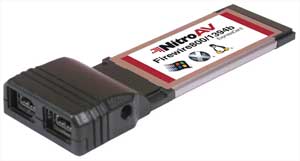
Fortunately, NitroAV was the "industry first" to release an ExpressCard/34 expansion slot with two Firewire "800" ports for the MacBook Pro, supporting MacOS X 10.4.6+. The company describes that their product:
Allows you to easily connect your FireWire 800 peripherals to your ExpressCard[/34] slot. ExpressCard technology is different than PCMCIA because it has an increased transfer rate and better efficiency between the computer and external peripherals.
This ExpressCard [provides] 2 FireWire 800 slots (2x - 9Pin) connectors. You can use different cables to match your particular FireWire peripherals depending on what you need. With the FireWire 800 protocol you can get transfer rates of 100, 200, 400, and 800 Mbps.
After NitroAV, other companies, including APIOTEK, EZQuest, SIIG, and Sonnet released ExpressCard/34 expansion cards that are compatible with all MacBook Pro models and provide Firewire "800" ports. Site sponsor Other World Computing sells a wide variety of these ExpressCard/34 expansion cards.
Also see: Is an external SATA adapter available for the MacBook Pro?
Permalink | Report an Error/Typo | Sign Up for Site Update Notices
Established in 1996, EveryMac.com has been created by experts with decades of experience with Apple hardware. EveryMac.com includes, and always has included, original research incorporating detailed, hands-on inspection of packaging, computers, and devices as well as extensive real-world use. All information is provided in good faith, but no website or person is perfect. Accordingly, EveryMac.com is provided "as is" without warranty of any kind whatsoever. EveryMac.com, and the authors thereof, shall not be held responsible or liable, under any circumstances, for any damages resulting from the use or inability to use the information within. For complete disclaimer and copyright information please read and understand the Terms of Use and the Privacy Policy before using EveryMac.com. Copying, scraping, or use of any content without expressed permission is not allowed, although links to any page are welcomed and appreciated.