
Hosted by site sponsor WebMate.
iPad Air Q&A
Published April 10, 2026
All Apple Q&As >> iPad Air Q&A (Home) | Also see: All iPad Specs
To be notified of new Q&As, sign up for EveryMac.com's bimonthly email list.
What are all the differences between the iPad Air M4 and the iPad Air M3 it replaced? How much faster is the iPad Air M4?
There are six iPad Air M3 models, released in 2025, as well as six iPad Air M4 models, released in 2026, as replacements for the iPad Air M3 line. Both lines have three 11" models and three 13" models.
The iPad Air M3 models with 11" displays are the iPad Air M3 11" (Wi-Fi Only), M3 11" (Wi-Fi+Cell), and M3 11" (Wi-Fi+Cell China). Those with 13" displays are the iPad Air M3 13" (Wi-Fi Only), M3 13" (Wi-Fi+Cell), and M3 13" (Wi-Fi+Cell China).
The iPad Air M4 models with 11" displays are the iPad Air M4 11" (Wi-Fi Only), M4 11" (Wi-Fi+Cell), and M4 11" (Wi-Fi+Cell China). Those with 13" displays are the iPad Air M4 13" (Wi-Fi Only), M4 13" (Wi-Fi+Cell), and M4 13" (Wi-Fi+Cell China).
For simplicity, this EveryiPad.com Q&A primarily refers to these lines collectively as the iPad Air M3 and iPad Air M4.
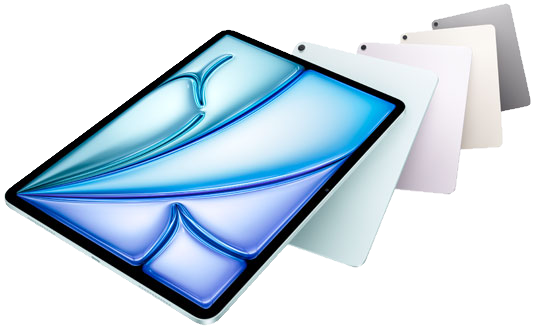
Photo Credit: Apple, Inc. (iPad Air M3 & M4 Color Options)
With even a detailed inspection of the iPad Air M3 and iPad Air M4, it is nearly impossible to tell them apart; the dimensions and even the colors are the same.
In fact, the quickest comparison is simply that the iPad Air M4 is the iPad Air M3 with a newer processor, more RAM, and newer connectivity. In benchmark tests, the iPad Air M4 is around 22% faster than the iPad Air M3 in single core tasks, 14% faster in multicore tasks, and 19% faster in graphics tests. A nice speed bump, but definitely not an earth shattering one.
However, it is still useful to know the internal technical differences and the identifiers that are a necessity to tell them apart. It is worthwhile to know the similarities, too. A detailed comparison can be especially helpful, accordingly.
External Design & Color Differences
All iPad Air M3 and iPad Air M4 tablets share the same general housing design with rounded corners and flat sides, a black glass front and the same color choices -- a (light) Blue, (light) Purple, warm gray "Starlight", or darker "Space Gray" aluminum back.
The iPad Air M3 and iPad Air M4 models also use the same displays. These are antireflective, LED-backlit "Liquid Retina" displays (264 ppi, 500 nits) surrounded by a thin black bezel. They provide "wide color" (DCI-P3) support and Apple's "True Tone" technology. They do not support ProMotion (120 Hz refresh rate). The 11" models have a 2360x1640 resolution and the 13" models have a 2732x2048 resolution.
Both lines support "Touch ID" capability built into the power button on the top of the device and have stereo speakers and dual microphones.
The 11" iPad Air M3 models officially weigh a tiny bit less, but all of the 11" models weigh about a pound and the 13" models weigh about 1.3 pounds:
 iPad Air M3 |
iPad Air M4 |
|
| Colors: | Space Gray Starlight Blue Purple |
Space Gray Starlight Blue Purple |
| Height x Width (In.): | 9.74 x 7.02 (11") 11.04 x 8.46 (13") |
9.74 x 7.02 (11") 11.04 x 8.46 (13") |
| Depth (In.): | 0.24 | 0.24 |
| Weight (Lbs.): | 1.01 (11") 1.36 (13") |
1.02/1.03 (11") 1.36 (13") |
Accessory Support Differences
The iPad Air M3 and iPad Air M4 models all support the Apple Pencil Pro that conveniently charges via a magnetic connection on the side as well as the cheaper Apple Pencil (USB-C) that charges awkwardly via USB-C cable.
Alongside the iPad Air M3, Apple introduced new "Magic Keyboard for the iPad Air" options -- a Magic Keyboard 11" and Magic Keyboard 13" -- that include a 14-key function row and a larger trackpad. Only available in white, this keyboard does not have backlit keys or haptic feedback.
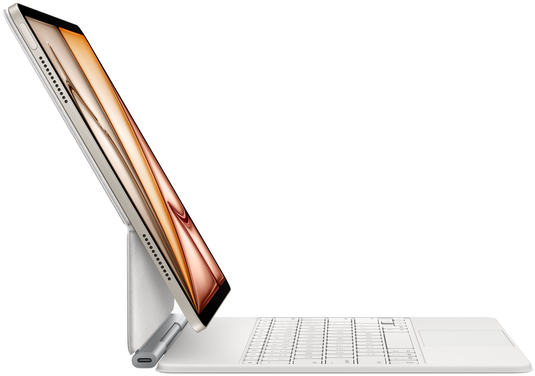
Photo Credit: Apple, Inc. (iPad Air M3 with Magic Keyboard for iPad Air)
The iPad Air M4 models work with the keyboards introduced with the iPad Air M3, but Apple also introduced new black Magic Keyboard 11" and Magic Keyboard 13" options. These are compatible with the earlier iPad Air M3 line, too.
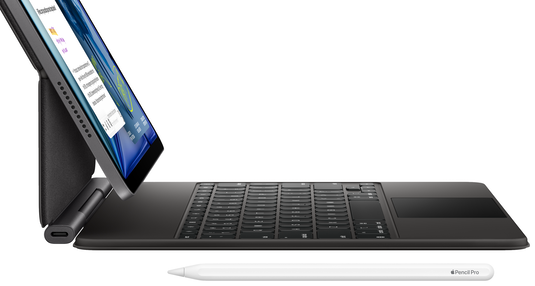
Photo Credit: Apple, Inc. (iPad Air M4 with Magic Keyboard for iPad Air)
Camera Differences
The cameras in the iPad Air M3 and iPad Air M4 are the same:
iPad Air M3 |
iPad Air M4 |
|
| Front Camera | ||
| Alignment: | Landscape | Landscape |
| Megapixels: | 12 MP | 12 MP |
| Aperture: | f/2.4 | f/2.4 |
| Video: | 1080p | 1080p |
| Center Stage: | Yes | Yes |
| Rear Camera | ||
| Megapixels: | 12 MP | 12 MP |
| Aperture: | f/1.8 | f/1.8 |
| Video: | 4K | 4K |
Identification Differences
It is difficult not to confuse the iPad Air M3 and iPad Air M4 models with each other and with any number of other iPads. Accordingly, visual identification is not a good method for differentiation.
Instead, one of the best methods for identification is via Model Number:
iPad |
Model No |
EveryiPad.com's Ultimate iLookup feature also can precisely identify these iPad models by its specific Order Number (referred to as "Model" within the iOS "Settings" app under General > About).
Internal & Connectivity Differences
The iPad Air M3 and iPad Air M4 models share some internal parts, but also have a number of important technical differences internally, as well:
iPad Air M3 |
iPad Air M4 |
|
| Clockspeed: | 4.05 GHz | 4.1 GHz |
| Processor: | M3 | M4 |
| Processor Cores: | 8 | 8 |
| Graphics Cores: | 9 | 9 |
| Neural Engine: | Yes | Yes |
| RAM: | 8 GB | 12 GB |
| Storage: | 128/256 GB 512 GB/1 TB |
128/256 GB 512 GB/1 TB |
| Wi-Fi: | Wi-Fi 6E | Wi-Fi 7 |
| 4G/LTE Bands: | 29-31 Bands | 29-31 Bands |
| 5G Bands: | 26 Bands | 25 Bands* |
| Bluetooth: | 5.3 | 6 |
| Port Type: | USB-C | USB-C |
* It is unlikely to matter, but the iPad Air M4 drops support for 5G band n76 (SDL 1500) that is supported by the iPad Air M3.
To reiterate, with its newer processor design and additional RAM, the iPad Air M4 is about 22% faster in single core tasks, 14% faster in multicore tasks, and 19% faster in graphics tests.
Apple estimates around ten hours of runtime for all of these tablets on Wi-Fi and around nine hours of runtime for cellular models when using a cellular network.
iPadOS Support Differences
The iPad Air M3 models first shipped with iPadOS 18.3 (22D2062); the iPad Air M4 models first shipped with iPadOS 26.3.1 (23D8133).
Both lines fully support iPadOS 26, the current version of the iPadOS, including the Apple Intelligence (AI) feature.
iPad Air M3 and iPad Air M4 Comparison Chart
The above differences between the iPad Air M3 and iPad Air M4 -- as well as original US pricing details -- are summarized below:
iPad Air M3 |
iPad Air M4 |
|
| Display: | 10.9" / 12.9" | 10.9" / 12.9" |
| Resolution: | 2360x1640 2732x2048 |
2360x1640 2732x2048 |
| Clockspeed: | 4.05 GHz | 4.1 GHz |
| Processor: | M3 | M4 |
| Processor Cores: | 8 | 8 |
| Graphics Cores: | 9 | 9 |
| RAM: | 8 GB | 12 GB |
| Storage: | 128/256 GB 512 GB/1 TB |
128/256 GB 512 GB/1 TB |
| Wi-Fi: | Wi-Fi 6E | Wi-Fi 7 |
| 4G/LTE Bands: | 29-31 Bands | 29-31 Bands |
| 5G Bands: | 26 Bands | 25 Bands |
| Apple Pencil: | Apple Pencil Pro | Apple Pencil Pro |
| eSIM: | Yes | Yes |
| Colors: | Space Gray Starlight Blue Purple |
Space Gray Starlight Blue Purple |
| Original iPadOS: | iPadOS 18.3 | iPadOS 26.3.1 |
| Maximum iPadOS: | Current | Current |
| Height x Width (In.): | 9.74 x 7.02 (11") 11.04 x 8.46 (13") |
9.74 x 7.02 (11") 11.04 x 8.46 (13") |
| Depth (In.): | 0.24 | 0.24 |
| Weight (Lbs.): | 1.01 (11") 1.36 (13") |
1.02/03 (11") 1.36 (13") |
| Orig. Price (Wi-Fi): | US$599-US$1299 | US$599-US$1299 |
| Orig. Price (Cell): | US$749-US$1449 | US$749-US$1449 |
For pricing in dozens of countries, see the "Global Prices" on the specs page for each iPad as well as the "By Global Original Prices" section of EveryiPad.com.
Comparison Summary
Ultimately, the iPad Air M4 is faster, has more RAM, and has newer wireless connectivity than the iPad Air M3 it replaced. It is a minor improvement, but an improvement nevertheless. The iPad Air M4 unveiled a black version of the iPad Air M3 keyboard -- with function keys and a relatively large trackpad -- as well.
Of course, more performance, more RAM, and newer connectivity always is good, but the iPad Air M3 certainly remains quite capable and is an especially good value on the used market as a result.
iPad Air Purchase & Sale Options
There are many companies that sell the iPad Air. However, buying from a quality company with significant Apple knowledge -- and after sales support -- will provide the best experience and save you money and time, too.
In the US, site sponsor Other World Computing sells used and refurb iPad Air models at bargain prices with free shipping, as well. Finally, if you need to sell an iPad, A+ BBB-rated Cash for Your Mac and GoRoostr will buy your older iPad with an instant quote and prompt payment.
In the UK, site sponsor Hoxton Macs has a large number of used and refurbished iPad models with a one-year warranty and free next day delivery throughout the UK.
Please also see EveryiPad.com's Ultimate iComparison feature to dynamically compare any iPad to any other iPod, iPhone, or iPad (new or old alike).
Permalink | Report an Error/Typo | Sign Up for Site Update Notices
<< iPad Air Q&A (Main) | All Apple Q&As
Established in 1996, EveryMac.com has been created by experts with decades of experience with Apple hardware. EveryMac.com includes, and always has included, original research incorporating detailed, hands-on inspection of packaging, computers, and devices as well as extensive real-world use. All information is provided in good faith, but no website or person is perfect. Accordingly, EveryMac.com is provided "as is" without warranty of any kind whatsoever. EveryMac.com, and the authors thereof, shall not be held responsible or liable, under any circumstances, for any damages resulting from the use or inability to use the information within. For complete disclaimer and copyright information please read and understand the Terms of Use and the Privacy Policy before using EveryMac.com. Copying, scraping, or use of any content without expressed permission is not allowed, although links to any page are welcomed and appreciated.