
Hosted by site sponsor WebMate.
Apple Silicon MacBook Air Q&A
Published April 20, 2026
All Mac Q&As >> Apple Silicon MacBook Air Q&A (Home)
To be notified of new Q&As, sign up for EveryMac.com's bimonthly email list.
What are all the differences between the "2026 M5" Apple Silicon MacBook Air models? What are all the differences between these models and the "2025 M4" MacBook Air models replaced?
There are three standard "2026 M5" MacBook Air models -- the MacBook Air "M5" 10 CPU/8 GPU 13", "M5" 10 CPU/10 GPU 13" and "M5" 10 CPU/10 GPU 15".
When Apple introduced the MacBook Air "M5" models, the company discontinued the previous "2025 M4" MacBook Air models -- the MacBook Air "M4" 10 CPU/8 GPU 13", "M4" 10 CPU/10 GPU 13" and "M4" 10 CPU/10 GPU 15".
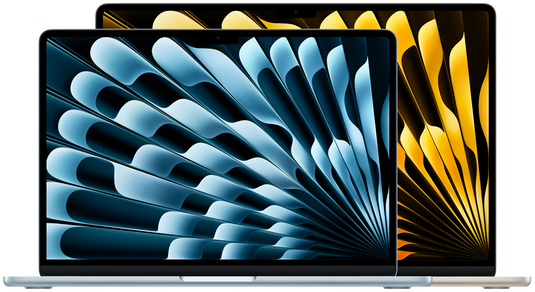
Photo Credit: Apple, Inc. (13" & 15" MacBook Air M5 Models)
With the two notebooks side-by-side and even a detailed evaluation, it would be reasonable to assess that the 13" and 15" MacBook Air "M5" models are identical apart from display size. The display is the major difference (the 15" models also have a six-speaker system instead of a four-speaker one), but they are highly similar. The MacBook Air "M5" models are quite similar to the "M4" models replaced, as well.
The shortest answer to this question is that the MacBook Air "M5" models have a faster architecture, faster storage, increased external display support, and improved wireless connectivity compared to the MacBook Air "M4" models replaced, but these differences are worth reviewing in more detail. There are a number of similarities that are worthwhile to understand, too.
External Differences
As you would expect, the 13" MacBook Air "M4" and "M5" models are are smaller than the 15" MacBook Air "M4" and "M5" models. The 13" models from each line are the same size and weight. The 15" models from each line are the same size and weight, also.
Specifically, the 13" models are 0.44 inches x 11.97 inches x 8.46 inches when closed and 2.7 pounds (1.24 kg) whereas the 15" models are slightly thicker as well as wider and deeper to accommodate the larger display (0.45 inches x 13.40 inches x 9.35 inches) and heavier (3.3 pounds; 1.51 kg).
Both lines are offered in the same pale blue-silver "Sky Blue", silver, warm gray "Starlight", and dark blue "Midnight" color options.
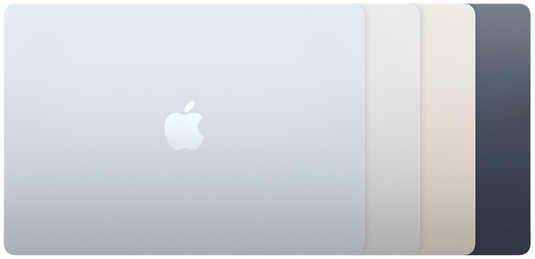
Photo Credit: Apple, Inc. (MacBook Air M4/M5 Color Options)
The "Liquid Retina" displays in both lines also are the same -- 13" models have a 13.6" (2560x1664) display and 15" models have a 15.3" (2880x1864) display. All displays are LED-backlit with IPS, Wide color (P3), "True Tone" technology that automatically adjusts color temperature, 224 ppi, and provide 500 nits of brightness.
All have a "notch" at the top of the screen that holds a webcam and related sensors including the same 1080p HD 12 megapixel "Center Stage" webcam with "Desk View" support.
Both MacBook Air "M4" and "M5" lines also have "Scissor Switch" keyboards, large "Force Touch" trackpads, Touch ID authentication, two Thunderbolt 4-capable ports (USB-C connector), a 3.5 mm headphone jack, and "MagSafe 3" power connector that disconnects cleanly if suddenly unplugged.
However, the newer MacBook Air "M5" models have improved external display support -- formally supporting full native resolution on the interior display and either "up to" two 6016x3384 (6K) external displays at 60 Hz, two 3840x2160 (4K) displays at 144 Hz, one 7680x4320 (8K) external display at 60 Hz, one 5120x2880 (5K) external display at 120 Hz, or one 3840x2160 (4K) external display at 240 Hz.
The earlier MacBook Air "M4" models, on the other hand, only support full native resolution on the interior display and up to two 6016x3384 (6K) external displays at 60 Hz.
The MacBook Air "M4" models support Wi-Fi 6E and Bluetooth 5.3 whereas the MacBook Air "M5" models support the newer Wi-Fi 7 and Bluetooth 6 standards.
Identification Differences
As carefully hand documented from each notebook itself by EveryMac.com, the MacBook Air "M4" and MacBook Air "M5" models all have different Model Numbers, EMC Numbers, and Model Identifiers.
Some MacBook Air identifiers are shared across years, but the MacBook Air "M4" and MacBook Air "M5" identifiers are unique to these models.
In general, the Model Identifier in software tends to be a reasonably reliable way to differentiate between notebook lines and others for the long-term, too:
| MacBook Air | Model No. | EMC No. | Model ID |
| M4, 2025 13" | A3240 | 8781 | Mac16,12 |
| M4, 2025 15" | A3241 | 8782 | Mac16,13 |
| M5, 2026 13" | A3449 | 8877 | Mac17,3 |
| M5, 2026 15" | A3448 | 8878 | Mac17,4 |
EveryMac.com's Ultimate Mac Lookup feature can uniquely identify each of these MacBook Air models by other identifiers, as well.
More information about specific identifiers is provided in EveryMac.com's extensive Mac Identification section.
Internal Differences
Some specific internal parts in the MacBook Air "M4" and MacBook Air "M5" models are different, but basically the "M5" is a simple "speed bump" update that shares much internally with its predecessors.
In overall performance, the MacBook Air "M5" line is around 12% faster in single core tasks and 15% faster in multicore tasks than the earlier MacBook Air "M4" line.
Each of these models essentially are sealed and disposable with processors, graphics processors, RAM, and storage that cannot be upgraded after purchase. The batteries are straightforward to replace, though.
Comparison Charts
The above differences between the MacBook Air "M4" and MacBook Air "M5" models -- processors, graphics, displays, speakers, external display support, wireless capabilities, identifiers, dimensions, weight, and starting prices -- are summarized below:
13" MacBook Air "M4" vs. MacBook Air "M5"
| MacBook Air 13" | 2025 M4 13" | 2026 M5 13" |
| Display: | 13.6" | 13.6" |
| Resolution: | 2560x1664 | 2560x1664 |
| Speaker System: | 4 Speakers | 4 Speakers |
| Processor: | Apple M4 | Apple M5 |
| Graphics: | 8/10 Cores | 8/10 Cores |
| Default RAM: | 16, 24 GB | 16, 24 GB |
| Max RAM: | 32 GB* | 32 GB* |
| Standard Storage: | 256, 512 GB | 512 GB, 1 TB |
| Max Storage: | 2 TB* | 4 TB* |
| Wi-Fi: | Wi-Fi 6E | Wi-Fi 7 |
| Bluetooth: | 5.3 | 6 |
| Ext. Displays: | 2 | 2** |
| Battery Life: | 15-18 Hours | 15-18 Hours |
| Battery W-Hr: | 52.6 W h | 52.6 W h |
| Dimensions: | 0.44 x 11.97 x 8.46 | 0.44 x 11.97 x 8.46 |
| Weight: | 2.7 lbs. (1.24 kg) | 2.7 lbs. (1.24 kg) |
| Model ID: | Mac16,12 | Mac17,3 |
| Orig. Price (US): | US$999 US$1199 US$1399 |
US$1099 US$1299 US$1499 |
| Orig. Price (CA): | C$1399 C$1699 C$1999 |
C$1499 C$1799 C$2099 |
| Orig. Price (UK): | £999 £1199 £1399 |
£1099 £1299 £1499 |
| Orig. Price (FR): | €1199 €1449 €1699 |
€1199 €1449 €1699 |
| Orig. Price (AU): | A$1699 A$1999 A$2299 |
A$1799 A$2099 A$2399 |
| Orig. Price (SG): | S$1499 S$1799 S$2099 |
S$1599 S$1899 S$2199 |
* These models can be configured with additional RAM and storage at the time of system purchase. The RAM and storage cannot be upgraded later.
** The MacBook Air "M5" supports full native resolution on the interior display and either "up to" two 6016x3384 (6K) external displays at 60 Hz, two 3840x2160 (4K) displays at 144 Hz, one 7680x4320 (8K) external display at 60 Hz, one 5120x2880 (5K) external display at 120 Hz, or one 3840x2160 (4K) external display at 240 Hz.
15" MacBook Air "M4" vs. MacBook Air "M5"
| MacBook Air 15" | 2025 M4 15" | 2026 M5 15" |
| Display: | 15.3" | 15.3" |
| Resolution: | 2880x1864 | 2880x1864 |
| Speaker System: | 6 Speakers | 6 Speakers |
| Processor: | Apple M4 | Apple M5 |
| Graphics: | 10 Cores | 10 Cores |
| Default RAM: | 16, 24 GB | 16, 24 GB |
| Max RAM: | 32 GB* | 32 GB* |
| Standard Storage: | 256, 512 GB | 512 GB, 1 TB |
| Max Storage: | 2 TB* | 4 TB* |
| Wi-Fi: | Wi-Fi 6E | Wi-Fi 7 |
| Bluetooth: | 5.3 | 6 |
| Ext. Displays: | 2 | 2** |
| Battery Life: | 15-18 Hours | 15-18 Hours |
| Battery W-Hr: | 66.5 W h | 66.5 W h |
| Dimensions: | 0.45 x 13.40 x 9.35 | 0.45 x 13.40 x 9.35 |
| Weight: | 3.3 lbs. (1.51 kg) | 3.3 lbs. (1.51 kg) |
| Colors: | Silver Starlight Midnight Sky Blue |
Silver Starlight Midnight Sky Blue |
| Model ID: | Mac16,13 | Mac17,4 |
| Orig. Price (US): | US$1199 US$1399 US$1599 |
US$1299 US$1499 US$1699 |
| Orig. Price (CA): | C$1699 C$1999 C$2299 |
C$1799 C$2099 C$2399 |
| Orig. Price (UK): | £1199 £1399 £1599 |
£1299 £1499 £1699 |
| Orig. Price (FR): | €1499 €1749 €1999 |
€1499 €1749 €1999 |
| Orig. Price (AU): | A$2099 A$2399 A$2699 |
A$2199 A$2499 A$2799 |
| Orig. Price (SG): | S$1799 S$2099 S$2399 |
S$1899 S$2199 S$2499 |
* These models can, or could, be configured with additional RAM and storage at the time of system purchase. The RAM and storage cannot be upgraded later.
** The MacBook Air "M5" supports full native resolution on the interior display and either "up to" two 6016x3384 (6K) external displays at 60 Hz, two 3840x2160 (4K) displays at 144 Hz, one 7680x4320 (8K) external display at 60 Hz, one 5120x2880 (5K) external display at 120 Hz, or one 3840x2160 (4K) external display at 240 Hz.
So, which MacBook Air "M5" model is best for me?
Ignoring earlier MacBook Air notebooks -- as well as the MacBook Neo line -- and just focusing on the different MacBook Air "M5" models, the decision essentially comes down to size and price.
If just you want the cheapest option among the three, the entry-level MacBook Air "M5" 10 CPU/8 GPU 13" is your best choice. Of course, if price is your most important criteria for a MacBook Air, any number of earlier models cost less used and would help you save more money.
If you want the MacBook Air with the largest screen among these options, then the 15" model -- the MacBook Air "M5" 10 CPU/10 GPU 15" -- is for you.
Evaluating the middle model in the lineup -- the MacBook Air "M5" 10 CPU/10 GPU 13" -- requires a bit more thought. Compared to the entry-level option, in its default configuration, it gets you two more graphics cores -- for about 12% faster graphics overall -- and twice the storage for an extra US$200; a reasonable value.
EveryMac.com always suggests custom configuring your MacBook Air with as much RAM as you can afford. More RAM will both improve performance and essentially increase the usable lifespan of your notebook, but it cannot be upgraded later; it is now or never.
Custom configuring the entry-level MacBook Air "M5" with 24 GB of RAM for an extra US$200 (instead of the GPU and storage upgrade), could be the best option for those who take good care of their hardware and want to maximize its use for a number of years. More storage is nice to have, but it is easy to add external storage later if needed.
In the US, site sponsor Other World Computing sells used and refurb MacBook Air models at bargain prices with free shipping, as well. On the other hand, if you need to sell a MacBook Air, A+ BBB-rated Cash for Your Mac and GoRoostr will buy your older notebook with an instant quote and prompt payment.
In the UK, site sponsor Hoxton Macs sells used MacBook Air models with a one-year warranty and free next day delivery throughout the UK.
Permalink | Report an Error/Typo | Sign Up for Site Update Notices
<< Apple Silicon MacBook Air Q&A (Main)
Established in 1996, EveryMac.com has been created by experts with decades of experience with Apple hardware. EveryMac.com includes, and always has included, original research incorporating detailed, hands-on inspection of packaging, computers, and devices as well as extensive real-world use. All information is provided in good faith, but no website or person is perfect. Accordingly, EveryMac.com is provided "as is" without warranty of any kind whatsoever. EveryMac.com, and the authors thereof, shall not be held responsible or liable, under any circumstances, for any damages resulting from the use or inability to use the information within. For complete disclaimer and copyright information please read and understand the Terms of Use and the Privacy Policy before using EveryMac.com. Copying, scraping, or use of any content without expressed permission is not allowed, although links to any page are welcomed and appreciated.