
Hosted by site sponsor WebMate.
MacBook Neo Q&A
Published April 28, 2026
All Mac Q&As >> MacBook Neo Q&A (Home)
To be notified of new Q&As, sign up for EveryMac.com's bimonthly email list.
What are the custom processor options for the MacBook Neo?
The MacBook Neo has a 4.0 GHz Apple A18 Pro processor with a 6-core CPU (2 performance, 4 efficiency) and a 5-core GPU. There are no custom processor options.
What type of RAM does the MacBook Neo use? Can it be upgraded?
The MacBook Neo has 8 GB of "unified" RAM integrated with the SoC. It has 60 GB/s memory bandwidth.
It is not possible to custom configure the MacBook Neo with more RAM at the time of purchase nor upgrade it later, either.
What type of internal storage does the MacBook Neo use? Is it possible to upgrade it?
The MacBook Neo has integrated internal storage. At the time of initial purchase, you can choose from configurations with 256 GB or 512 GB of internal SSD storage.
It is not possible to custom configure the MacBook Neo with higher capacity SSDs at the time of purchase. The storage cannot be upgraded after purchase, either.
How do you connect external storage to the MacBook Neo? What is the best option?
Although other options also will work, the best external storage for the MacBook Neo meets USB 3 (10 Gb/s) or faster speeds and is equipped with a USB-C port.
A couple of ideal options are the relatively affordable, compact OWC Envoy and very durable -- waterproof, even -- OWC Envoy Pro Elektron from site sponsor Other World Computing.
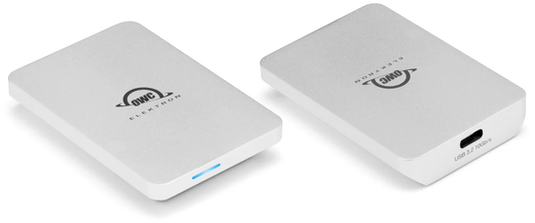
Photo Credit: OWC (Envoy Pro Elektron; Front & Back)
The OWC Envoy is available in 1 TB and 2 TB capacities whereas the OWC Envoy Pro Elektron is a bit faster with transfer speeds up to 1011MB/s and available in higher capacities up to 4 TB.
Although performance will be slower, it also is possible to use an older hard drive or SSD with a USB-A port and a USB-C to USB adapter.
What is the deal with the MacBook Neo USB-C ports? What is their optimal use?
Unusually for a Mac, the MacBook Neo has two USB-C ports, but their capability is not the same.
The rear USB-C port (toward the hinge; left side) is USB 3 capable and supports DisplayPort (for an external display) as well as charging and USB 3 (up to 10 Gb/s). The front USB-C port does not support video; it supports charging and USB 2 (up to 480 Mb/s).
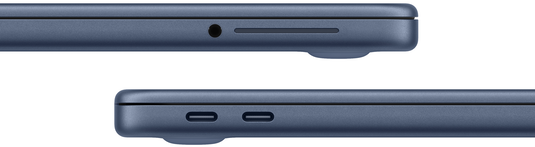
Photo Credit: Apple, Inc. (MacBook Neo Ports)
You will be alerted in software if you plug a display cable into the front port (it won't work) or if you plug in an adapter or external storage that is faster than the maximum speed provided by the front port.
Naturally, having two identical looking USB-C ports that perform differently is awkward -- and inevitably will be resolved by a future MacBook Neo model at some point -- but it is best to remember that the rear port is the "good" one and relegate the front port primarily to charging the notebook whenever possible.
Permalink | Report an Error/Typo | Sign Up for Site Update Notices
Established in 1996, EveryMac.com has been created by experts with decades of experience with Apple hardware. EveryMac.com includes, and always has included, original research incorporating detailed, hands-on inspection of packaging, computers, and devices as well as extensive real-world use. All information is provided in good faith, but no website or person is perfect. Accordingly, EveryMac.com is provided "as is" without warranty of any kind whatsoever. EveryMac.com, and the authors thereof, shall not be held responsible or liable, under any circumstances, for any damages resulting from the use or inability to use the information within. For complete disclaimer and copyright information please read and understand the Terms of Use and the Privacy Policy before using EveryMac.com. Copying, scraping, or use of any content without expressed permission is not allowed, although links to any page are welcomed and appreciated.