
Hosted by site sponsor WebMate.
MacBook Pro PROLED XDR Q&A
Published November 23, 2026
All Mac Q&As >> MacBook Pro PROLED XDR Q&A (Home)
To be notified of new Q&As, sign up for EveryMac.com's bimonthly email list.
What is the best "dock" to add more ports to the MacBook Pro PROLED XDR?
As shipped, the MacBook Pro PROLED XDR models all have a SDXC SD card slot, an HDMI port, three Thunderbolt 5 ports (up to 120 Gb/s), and a 3.5 mm headphone jack.
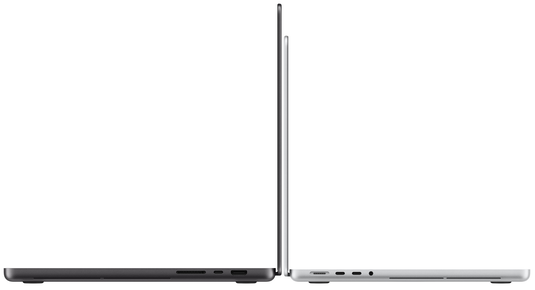
Photo Credit: Apple, Inc. (MacBook Pro PROLED XDR - Ports)
For some users, the standard ports on the MacBook Pro PROLED XDR could be sufficient, but for those who need to connect more to their notebook than simple adapters can provide -- or just who prefer the simplicity of only disconnecting and reconnecting a single cable when switching between desk and mobile use rather than individually disconnecting a variety of other items -- a full-fledged "dock" or "docking station" to park at your desk can be quite useful.
Although there also are other options, site sponsor Other World Computing has been well respected for its Mac upgrades and accessories for decades and has MacBook Pro PROLED XDR-compatible docks that could be ideal for you.
Best MacBook Pro PROLED XDR-Compatible Docks
Depending on your needs, three good MacBook Pro PROLED XDR docks to choose from include the simple and affordable OWC Thunderbolt 5 Hub, more capable OWC Thunderbolt 5 Dock, and monster OWC Thunderbolt 5 Dock with Dual HDMI.
All three of these docks support 140 watts of power delivery, perfect for charging the MacBook Pro PROLED XDR models, but otherwise provide a selection of different ports and capabilities from which to choose.

Photo Credit: OWC Thunderbolt 5 Hub
The simple and affordable OWC Thunderbolt 5 Hub provides:
- Four Thunderbolt 5 ports (one front and three back; one connects to your notebook)
- One USB-A (USB 3.2 10 Gb/s) port (front)
- Support for as many as three 8K displays
- 140W power delivery for charging your notebook
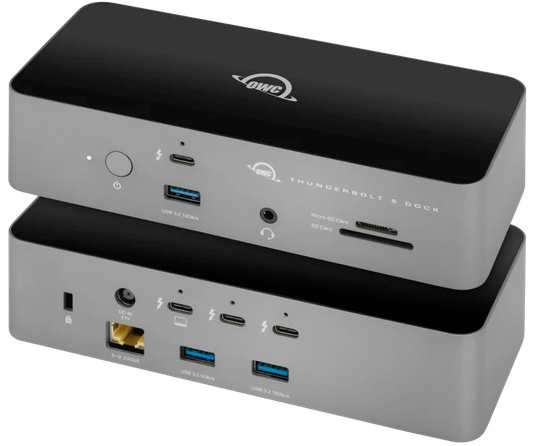
Photo Credit: OWC Thunderbolt 5 Dock
The more capable OWC Thunderbolt 5 Dock provides:
- Four Thunderbolt 5 ports (one front and three back; one connects to your notebook)
- Two USB-A (USB 3.2 10 Gb/s) ports (one front, one back)
- One USB-A (USB 3.2 5 Gb/s) port (back)
- 2.5Gb Ethernet (back)
- SD Card Reader (front)
- microSD Card Reader (front)
- Analog Audio In/Out (front)
- Support for as many as three 8K displays
- 140W power delivery for charging your notebook
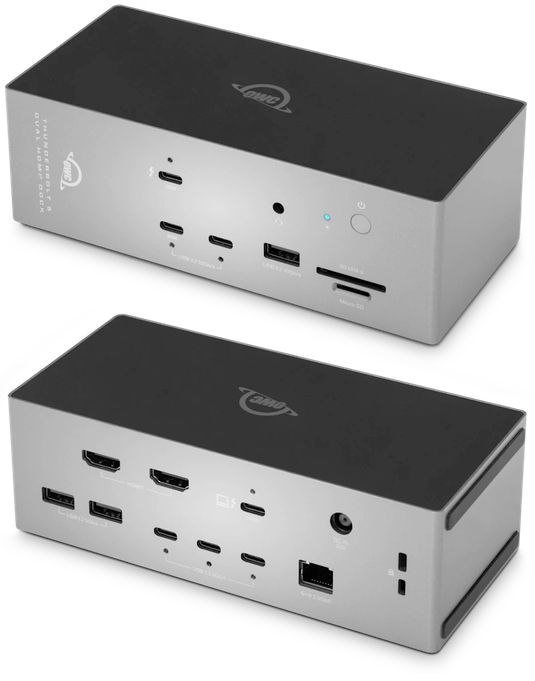
Photo Credit: OWC Thunderbolt 5 Dock with Dual HDMI
Finally, the monster OWC Thunderbolt 5 Dock with Dual HDMI provides:
- Two Thunderbolt 5 ports (one front, one back; one connects to your notebook)
- Two HDMI 2.1 ports (back)
- Two USB-C (USB 3.2 10 Gb/s) ports (front)
- Three USB-C (USB 3.2 5 Gb/s) ports (back)
- One USB-A (USB 3.2 10 Gb/s) port (front)
- Two USB-A (USB 3.2 10 Gb/s) ports (back)
- 2.5Gb Ethernet (back)
- SD Card Reader (front)
- microSD Card Reader (front)
- Analog Audio In/Out (front)
- Support for as many as three 6K displays or two 8K displays
- 140W power delivery for charging your notebook
Whether you simply need a few more Thunderbolt 5 ports or have a more complicated need for a mix of modern and legacy ports, one of these docks can help.
Site sponsor Other World Computing sells all of these Thunderbolt 5 docks in addition to a variety of others.
Permalink | Report an Error/Typo | Sign Up for Site Update Notices
<< MacBook Pro PROLED XDR Q&A (Main)
Established in 1996, EveryMac.com has been created by experts with decades of experience with Apple hardware. EveryMac.com includes, and always has included, original research incorporating detailed, hands-on inspection of packaging, computers, and devices as well as extensive real-world use. All information is provided in good faith, but no website or person is perfect. Accordingly, EveryMac.com is provided "as is" without warranty of any kind whatsoever. EveryMac.com, and the authors thereof, shall not be held responsible or liable, under any circumstances, for any damages resulting from the use or inability to use the information within. For complete disclaimer and copyright information please read and understand the Terms of Use and the Privacy Policy before using EveryMac.com. Copying, scraping, or use of any content without expressed permission is not allowed, although links to any page are welcomed and appreciated.