
Hosted by site sponsor WebMate.
MacBook Pro PROLED XDR FAQ @ EveryMac.com
Published November 24, 2026
Also see: Apple Silicon MacBook Pro Specs | All Mac Q&As
EveryMac.com's MacBook Pro "PROLED XDR" Q&A answers questions about the 2026 MacBook Pro models with a touch-capable OLED display.
These MacBook Pro models with 14" displays are model numbers A3468 and A3375 and these with 16" displays are model numbers A3469 and A3376.
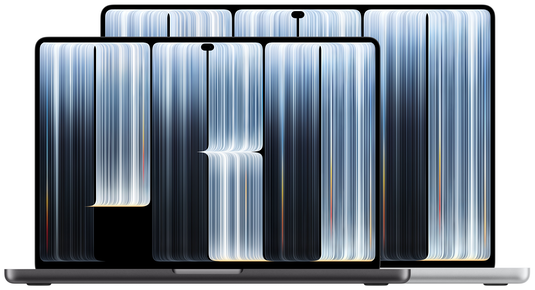
Questions range from "What are all the differences between the MacBook Pro PROLED XDR 'M5 Pro/M5 Max' and the 'regular' MacBook Pro 'M5 Pro/M5 Max'? Is a touchscreen the big difference?" to "What is the best 'dock' to add more ports to the MacBook Pro PROLED XDR?" and everything in between.
Please note that all MacBook Pro PROLED XDR models are current. This Q&A covers all of these MacBook Pro models in detail.
Most Frequently Asked MacBook Pro PROLED XDR Q&As:
What are all the differences between the MacBook Pro PROLED XDR "M5 Pro/M5 Max" models?
What external storage options are available for the MacBook Pro PROLED XDR? Which is best?
What are all the differences between the MacBook Pro PROLED XDR "M5 Pro/M5 Max" and the "regular" MacBook Pro "M5 Pro/M5 Max"? Is the touchscreen the big difference?
What is the best "dock" to add more ports to the MacBook Pro PROLED XDR?
What type of internal storage does the MacBook Pro PROLED XDR use? Is it possible to upgrade it?
What is the fastest Ethernet adapter for the MacBook Pro PROLED XDR?
What are the "pros and cons" of the MacBook Pro PROLED XDR? Is it for me?
What type of RAM does the MacBook Pro PROLED XDR use? Can it be upgraded?
Does the MacBook Pro PROLED XDR support an eGPU?
Can the MacBook Pro PROLED XDR run older macOS apps?
Software Compatibility Q&As:
What version of the macOS is pre-installed on the MacBook Pro PROLED XDR? What is the newest version of the macOS supported by each model?
How do you transfer data from an older Mac to setup a MacBook Pro PROLED XDR?
How do you restore the operating system on the MacBook Pro PROLED XDR?
Can the MacBook Pro PROLED XDR run iPad apps?
Can the MacBook Pro PROLED XDR run older macOS apps?
Can the MacBook Pro PROLED XDR run Windows?
Comparison & Performance Q&As:
What are all the differences between the MacBook Pro PROLED XDR "M5 Pro/M5 Max" models?
What are all the differences between the MacBook Pro PROLED XDR "M5 Pro/M5 Max" and the "regular" MacBook Pro "M5 Pro/M5 Max"? Is the touchscreen the big difference?
What are the "pros and cons" of the MacBook Pro PROLED XDR? Is it for me?
Upgrades, Expansion, Battery, & Power Q&As:
What custom CPU options are available for the MacBook Pro PROLED XDR?
What type of RAM does the MacBook Pro PROLED XDR use? Can it be upgraded?
What type of internal storage does the MacBook Pro PROLED XDR use? Is it possible to upgrade it?
What external storage options are available for the MacBook Pro PROLED XDR? Which is best?
What is the best "dock" to add more ports to the MacBook Pro PROLED XDR?
What is the fastest Ethernet adapter for the MacBook Pro PROLED XDR?
What is the maximum supported resolution for an external display connected to the MacBook Pro PROLED XDR? What options are available?
How many GPU cores are provided by each MacBook Pro PROLED XDR? Is it possible to upgrade the GPU?
Does the MacBook Pro PROLED XDR support an eGPU?
What type of power connector does each MacBook Pro PROLED XDR use?
Configuration & Purchasing Q&As:
Where can I buy a MacBook Pro PROLED XDR?
Where can I sell a MacBook Pro PROLED XDR?
What are the custom configuration options for the MacBook Pro PROLED XDR?
What are the "pros and cons" of the MacBook Pro PROLED XDR? Is it for me?
Established in 1996, EveryMac.com has been created by experts with decades of experience with Apple hardware. EveryMac.com includes, and always has included, original research incorporating detailed, hands-on inspection of packaging, computers, and devices as well as extensive real-world use. All information is provided in good faith, but no website or person is perfect. Accordingly, EveryMac.com is provided "as is" without warranty of any kind whatsoever. EveryMac.com, and the authors thereof, shall not be held responsible or liable, under any circumstances, for any damages resulting from the use or inability to use the information within. For complete disclaimer and copyright information please read and understand the Terms of Use and the Privacy Policy before using EveryMac.com. Copying, scraping, or use of any content without expressed permission is not allowed, although links to any page are welcomed and appreciated.