
Hosted by site sponsor WebMate.
Apple Silicon MacBook Pro Q&A
Published April 24, 2026
All Mac Q&As >> Apple Silicon MacBook Pro Q&A (Home)
To be notified of new Q&As, sign up for EveryMac.com's bimonthly email list.
What are all the differences between the 14" and 16" Apple Silicon MacBook Pro "M5/M5 Pro/M5 Max" models? Which is best for me?
There are four standard "2025/2026" 14" MacBook Pro models -- the MacBook Pro "M5" 10 CPU/10 GPU 14", "M5 Pro" 15 CPU/16 GPU 14", "M5 Pro" 18 CPU/20 GPU 14", and "M5 Max" 18 CPU/32 GPU 14" -- and three standard "2026" 16" MacBook Pro models -- the MacBook Pro "M5 Pro" 18 CPU/20 GPU 16", "M5 Max" 18 CPU/32 GPU 16", and "M5 Max" 18 CPU/40 GPU 16".
As organized by EveryMac.com, there also is a distinct configure-to-order "2026" 14" model -- the MacBook Pro "M5 Max" 18 CPU/40 GPU 14".
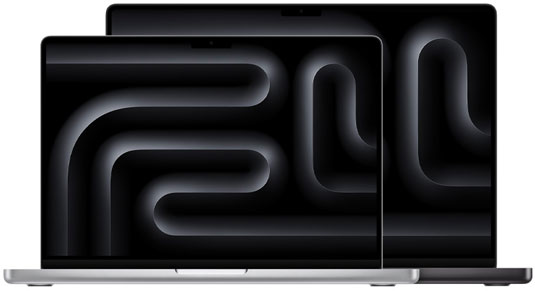
Photo Credit: Apple, Inc. (14" and 16" MacBook Pro M5/M5 Pro/M5 Max)
With a mere glance at the "2025/2026" 14" and 16" MacBook Pro M5/M5 Pro/M5 Max line, it is obvious that the 16" models are physically larger and have larger displays, but there are other significant differences that are not obvious -- especially for the entry-level 14" model -- and these are valuable to understand, too.
External Differences
The "2025/2026" 14" and 16" MacBook Pro models use "sealed" aluminum and glass cases in silver or "Space Black" color options. As you would expect, the 16" models are larger and heavier (4.7 pounds compared to 3.4, 3.5, or 3.6 pounds for the smaller notebooks, which vary in weight based on the processor type).
Both sizes have an all black, backlit keyboard set in a black background with "traditional" function keys as well as a "Touch ID" for login.
Both the 14" and 16" MacBook Pro models have LED-backlit "Liquid Retina XDR" displays -- 14.2" (3024x1964) and 16.2" (3456x2234), respectively. Both displays are 254 ppi, provide up to 1000 nits of brightness for SDR content (outdoors), up to 1000 nits of sustained full-screen brightness, 1600 nits peak brightness displaying HDR content, and a 1,000,000:1 contrast ratio, as well as support for 1 billion colors, Wide color (P3), True Tone, and ProMotion (for adaptive refresh rates). Both display sizes also can be custom configured with a reduced glare "nano-texture" display for an extra US$150.
Finally, all of these models include the same 12 megapixel "Center Stage" camera -- that automatically tracks and zooms to keep subjects in frame -- tucked in a "notch" at the upper portion of the display, "Studio-quality three-mic array with high signal-to-noise ratio and directional beamforming" as well as "Voice Isolation and Wide Spectrum" modes for enhanced voice clarity, "high-fidelity six-speaker sound system with force-cancelling woofers," and big "Force Touch" trackpads.
Connectivity Differences
Connectivity is a noteworthy point of differentiation between the "2025/2026" 14" and 16" MacBook Pro models. All of these notebooks have an HDMI port, a 3.5" analog headphone jack "with advanced support for high-impedance headphones," an SDXC-capable SD card slot, and a magnet-equipped "MagSafe 3" power connector.
However, the entry-level MacBook Pro "M5" 10 CPU/10 GPU 14" has three Thunderbolt 4 (40 Gb/s) ports whereas all other models have three significantly faster Thunderbolt 5 ports (120 Gb/s). The entry-level model also has Wi-Fi 6E and Bluetooth 5.3 whereas the "M5 Pro/M5 Max" models all support the newer Wi-Fi 7 and Bluetooth 6 standards.
Display Support & Power Differences
Regardless of the size of the internal display, there also are external display support differences between models equipped with M5, M5 Pro, and M5 Max processors.
The entry-level MacBook Pro "M5" 10 CPU/10 GPU 14" supports full native resolution on the interior display in addition to a maximum of:
- Up to two 6016x3384 (6K) external displays at 60 Hz.
- One external display "up to" 6016x3384 (6K) at 60 Hz over Thunderbolt and one external display "up to" 3840x2160 (4K) at 144 MHz over HDMI.
- One external display at 7680x4320 (8K) at 60 Hz or one external display at 3840x2160 (4K) at 240 Hz over HDMI.
Notebooks with M5 Pro processors support full native resolution on the interior display in addition to a maximum of:
- Up to three 6016x3384 (6K) external displays at 60 Hz.
- Up to three 3840x2160 (4K) external displays at 144 Hz.
- One external display at 7680x4320 (8K) at 60 Hz, 5120x2880 (5K) at 120 Hz, or 3840x2160 (4K) at 240 Hz and a second display at 5120x2880 (5K) at 120 Hz or at 3840x2160 (4K) at 200 Hz.
Finally, notebooks with M5 Max processors support full native resolution on the interior display, as well as a maximum of:
- Up to four 6016x3384 (6K) external displays at 60 Hz.
- Up to four 3840x2160 (4K) external displays at 144 Hz.
- Up to two external displays at 7680x4320 (8K) at 60 Hz, 5120x2880 (5K) at 120 Hz, or 3840x2160 (4K) at 240 Hz.
By default, the entry-level MacBook Pro "M5" 10 CPU/10 GPU 14" and MacBook Pro "M5 Pro" 15 CPU/16 GPU 14" ship with a 70W USB-C power adapter that is not capable of fast charging to 50% of capacity in 30 minutes. Higher-end 14" models ship with a 96W USB-C power adapter that is capable of fast charging and the 16" models all ship with a 140W USB-C power adapter that likewise is capable of fast charging.
Identification Differences
It is easy to mix up the "2025/2026" 14" and 16" MacBook Pro models with any number of other similar MacBook Pro models. It is not possible to differentiate between models with different processors within each line by appearance alone, either.
However, both Model Numbers externally and Model Identifiers, in software, are precise enough to collectively identify these models and even to differentiate by processor type (but not processor cores in some instances).
Just as the site has done for decades, EveryMac.com diligently has hand documented all of these details from the hardware itself for your convenience:
MacBook Pro Model |
Model No |
Model ID |
Additionally, EveryMac.com's Ultimate Mac Lookup feature can identify these notebooks by other information, too.
Internal Differences
Although there are differences between specific interior parts, "2025/2026" MacBook Pro models equipped with the same processors have essentially the same performance-related components. All have onboard processors as well as integrated RAM and storage that cannot be upgraded after purchase.
There also are substantial battery life differences between models. The 14" models have an integrated 72.4 watt-hour battery and the 16" models have an integrated 100-watt hour battery. However, models with slower processors actually have longer battery life; certainly something to consider if battery life on the go is more important to you than speed.
Comparison Chart
The major differences between the "2025/2026" 14" and 16" MacBook Pro models are summarized below. Please refer to the specs page for the model of interest for complete details:
 14" 2025 M5 |
14" 2026 |
 16" 2026 |
|
|---|---|---|---|
| Display Size: | 14.2" | 14.2" | 16.2" |
| Resolution: | 3024x1964 | 3024x1964 | 3456x2234 |
| Architecture: | M5 | M5 Pro/M5 Max | M5 Pro/M5 Max |
| Processor Cores: | 10 | 15-18 | 18 |
| Graphics Cores: | 10 | 16-40 | 20-40 |
| Standard RAM: | 16/24/32 GB | 24/36/48 GB* | 24/36/48 GB* |
| Maximum RAM: | 32 GB | 36-128 GB* | 36/64/128 GB* |
| Standard Storage: | 512 GB, 1 TB** | 1 TB, 2 TB | 1 TB, 2 TB |
| Maximum Storage: | 4 TB | 4/8 TB† | 4/8 TB† |
| Thunderbolt: | 3 (TB 4) | 3 (TB 5) | 3 (TB 5) |
| Ext. Displays: | 2 | 3/4 | 3/4 |
| Wi-Fi: | 6E | 7 | 7 |
| Bluetooth: | 5.3 | 6 | 6 |
| Battery W Hrs: | 72.4 W Hr | 72.4 W Hr | 100 W Hr |
| Battery Life: | 16-24 Hours | 13-22 Hours | 16-24 Hours |
| Fast Charge: | No‡ | No/Yes‡ | Yes |
| Color Options: | Silver/Black | Silver/Black | Silver/Black |
| Height (In): | 0.61 | 0.61 | 0.66 |
| Width (In): | 12.31 | 12.31 | 14.01 |
| Depth (In): | 8.71 | 8.71 | 9.77 |
| Weight: | 3.4 lbs. | 3.5-3.6 lbs. | 4.7 lbs. |
| Model Number: | A3434 | A3426 A3427 |
A3428 A3429 |
| Model Identifier: | Mac17,2 | Mac17,9 Mac17,7 |
Mac17,8 Mac17,6 |
| Intro Price (US): | US$1599** US$1799**US$1999** | US$2199 US$2599 US$2799 US$3599 |
US$2699 US$3099 US$3899 US$4399 |
| Intro Price (CA): | C$2099 C$2349 C$2699 |
C$2999 C$3599 C$3899 C$4999 |
C$3599 C$4199 C$5399 C$6199 |
| Intro Price (UK): | £1599 £1799 £1999 |
£2199 £2599 £2799 £3599 |
£2699 £3099 £3899 £4399 |
| Intro Price (AU): | A$2499 A$2799 A$3099 |
A$3499 A$4099 A$4499 A$5799 |
A$4299 A$4899 A$6299 A$6999 |
| Intro Price (SG): | S$2199 S$2499 S$2799 |
S$2999 S$3599 S$3899 S$5099 |
S$3649 S$4249 S$5449 S$6199 |
* These MacBook Pro models can be custom configured with more RAM, but only at the time of initial purchase. The "M5 Pro" processor cannot support more than 64 GB of RAM. If configured with an "M5 Max" processor, the minimum RAM option is 36 GB and the maximum is 128 GB depending on the specific model.
** As first introduced on October 15, 2025, there were three default configurations of this model. Configured with 16 GB of RAM and a 512 GB SSD, it cost US$1599; with 16 GB of RAM and 1 TB SSD, US$1799; and with 24 GB of RAM and a 1 TB SSD, US$1999. On March 3, 2026, Apple changed the default RAM configurations of the entry-level MacBook Pro to 16 GB, 24 GB, and 32 GB of RAM -- all with 1 TB of storage -- for US$1699, US$1899, and US$2099, respectively.
† Some of these MacBook Pro models can be custom configured with as much as 8 TB of storage at the time of initial purchase. The storage cannot be upgraded later.
‡ If equipped with a 70W USB-C power adapter, this model is not capable of "Fast Charging." If it is equipped with a 96W USB-C power adapter, it is capable.
For introductory pricing in dozens of other countries, see the "Global Prices" on the specs page for each Mac as well as the "By Global Original Prices" section of EveryMac.com.
So, which is best for my needs? Which is the best value in terms of price for performance?
Ultimately, just comparing these models and ignoring others, the "2025/2026" 14" and 16" MacBook Pro models are the best notebooks Apple makes. They are expensive and relatively big and heavy, but if you have the budget, they are about as good as it gets.
If speed and a big, beautiful display are your highest priorities, a 16" MacBook Pro is the best choice. It is quite expensive, though. The 14" models can be equipped with the exact same processor/graphics processor combos, though, so it is not a requirement to sacrifice speed to get the smaller size. Accordingly, a 14" MacBook Pro model also can be a great option that balances performance, portability, and price.
It's really your choice, and in general, if your notebook is for work and you can put the performance to good use, in this price bracket, you should buy the fastest you can afford.
However, based on our experience -- and a personal preference for a relatively small notebook for portability sake (equipped with a large external display when available) -- among these models, EveryMac.com likely would go with the MacBook Pro "M5 Pro" 15 CPU/16 GPU 14". It gets you in the ballpark of 44% more multicore performance than the entry-level MacBook Pro "M5" 10 CPU/10 GPU 14" for only about 30% more money -- as well as faster ports and wireless connectivity -- and represents a particularly good value as a result.
Of course, to save money, any number of used MacBook Pro models are well worth considering, too.
In the US, site sponsor Other World Computing sells used and refurb MacBook Pro models at bargain prices with free shipping, as well. On the other hand, if you need to sell a MacBook Pro, A+ BBB-rated Cash for Your Mac and GoRoostr will buy your older notebook with an instant quote and prompt payment.
In the UK, site sponsor Hoxton Macs sells used MacBook Pro models with a one-year warranty and free next day delivery throughout the UK.
Permalink | Report an Error/Typo | Sign Up for Site Update Notices
<< Apple Silicon MacBook Pro Q&A (Main) | All Mac Q&As
Established in 1996, EveryMac.com has been created by experts with decades of experience with Apple hardware. EveryMac.com includes, and always has included, original research incorporating detailed, hands-on inspection of packaging, computers, and devices as well as extensive real-world use. All information is provided in good faith, but no website or person is perfect. Accordingly, EveryMac.com is provided "as is" without warranty of any kind whatsoever. EveryMac.com, and the authors thereof, shall not be held responsible or liable, under any circumstances, for any damages resulting from the use or inability to use the information within. For complete disclaimer and copyright information please read and understand the Terms of Use and the Privacy Policy before using EveryMac.com. Copying, scraping, or use of any content without expressed permission is not allowed, although links to any page are welcomed and appreciated.