
Hosted by site sponsor WebMate.
iPad Air Q&A
Published April 9, 2026
All Apple Q&As >> iPad Air Q&A (Home) | Also see: All iPad Specs
To be notified of new Q&As, sign up for EveryMac.com's bimonthly email list.
What are the "pros and cons" of the iPad Air M4? Is it the iPad for me?
Only you can decide if a new iPad Air M4 is the best iPad for you, but an independent and objective "pros and cons" can help you make an educated choice.
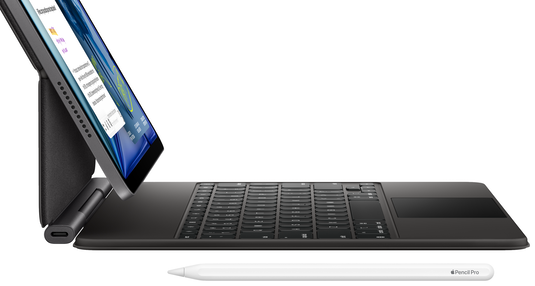
Photo Credit: Apple, Inc. (iPad Air M4 with Magic Keyboard)
There are six iPad Air M4 models. Three with 11" displays -- the iPad Air M4 11" (Wi-Fi Only), M4 11" (Wi-Fi+Cell), and M4 11" (Wi-Fi+Cell China) -- and three with 13" displays -- the iPad Air M4 13" (Wi-Fi Only), M4 13" (Wi-Fi+Cell), and M4 13" (Wi-Fi+Cell China).
If you would prefer a more detailed take, EveryiPad.com also provides an in-depth comparison of the iPad Air M3 and iPad Air M4 models. The quickest version is that the iPad Air M4 is faster, packs more RAM, and has more advanced connectivity than the model it replaced.
For those who would like a simple rundown, this summary should be ideal:
Pros:
- Attractive, thin design with flat, easy-to-hold sides.
- Bright, high-resolution 11" and 13" "Liquid Retina" display options.
- Reasonably fast (more than twice as fast as the cheaper "regular" iPad in multicore tasks released at the same time and only about 14% slower than the much more expensive iPad Pro M5).
- Solid battery life.
- Higher capacity storage options (up to 1 TB).
- System-wide mirroring support.
- Support for 5G on cellular-equipped models in addition to Wi-Fi 7.
- Logical landscape (horizontal) front camera and helpful Center Stage automatically tracks and zooms for better video conferencing.
- Touch ID support is cleverly integrated in the power button.
- Support for the well-designed Apple Pencil Pro.
Cons:
- Screens are relatively low quality by today's standards (not OLED, no ProMotion).
- The battery is not intended to be replaced and self-replacement is more difficult than it needs to be (at least it has interior pull tabs, though).
- Internal storage cannot be upgraded.
- No SD card slot.
- Shooting photos and video with such a physically large device is awkward.
- USB-C is relatively slow compared to Thunderbolt.
- No bundled headphones (a particularly miserly omission given the price of the device).
- Not backwards compatible with the Apple Pencil 2.
So, is the iPad Air M4 right for me?
Personally, we consider the iPad Air M4 to be the best new iPad for most users; it hits the right balance of price and performance.
The entry-level "regular" iPad models are consistently slower and dated in their feature set, yet the iPad Air M4 models start at only US$150 more and likely will be usable for longer. Likewise, the iPad Pro models start at US$400 more than the iPad Air M4 and although they are a bit faster and have beautiful displays, they really are quite expensive for most users.
These iPad Air models are ideal for anyone who finds the regular iPad too slow or dated and the high-end iPad Pro too expensive. The iPad Air M4 packs a great deal of value in an attractive package. If you are on a tight budget, a used iPad Air is well worth considering, too.
In the US, site sponsor Other World Computing sells used and refurb iPad Air models at bargain prices with free shipping, as well. Finally, if you need to sell an iPad, A+ BBB-rated Cash for Your Mac and GoRoostr will buy your older iPad with an instant quote and prompt payment.
In the UK, site sponsor Hoxton Macs has a large number of used and refurbished iPad models with a one-year warranty and free next day delivery throughout the UK.
Please also see EveryiPad.com's Ultimate iComparison feature to dynamically compare any iPad model to any other iPod, iPhone, or iPad.
Permalink | Report an Error/Typo | Sign Up for Site Update Notices
<< iPad Air Q&A (Main) | All Apple Q&As
Established in 1996, EveryMac.com has been created by experts with decades of experience with Apple hardware. EveryMac.com includes, and always has included, original research incorporating detailed, hands-on inspection of packaging, computers, and devices as well as extensive real-world use. All information is provided in good faith, but no website or person is perfect. Accordingly, EveryMac.com is provided "as is" without warranty of any kind whatsoever. EveryMac.com, and the authors thereof, shall not be held responsible or liable, under any circumstances, for any damages resulting from the use or inability to use the information within. For complete disclaimer and copyright information please read and understand the Terms of Use and the Privacy Policy before using EveryMac.com. Copying, scraping, or use of any content without expressed permission is not allowed, although links to any page are welcomed and appreciated.