
Hosted by site sponsor WebMate.
MacBook Neo Q&A
Published April 29, 2026
All Mac Q&As >> MacBook Neo Q&A (Home)
To be notified of new Q&As, sign up for EveryMac.com's bimonthly email list.
Is it possible to replace the battery in the MacBook Neo? How?
The MacBook Neo has an integrated 36.5 watt-hour lithium polymer battery.

Photo Credit: Apple, Inc. (MacBook Neo)
Identification Help
If you're not sure whether you have a MacBook Neo or another Mac model, different notebooks can be pinpointed by several different identifiers -- the Model Number, EMC Number, and Model Identifier.
The Model Number, listed on the underside of each notebook, is sufficient to collectively identify the MacBook Neo models and this seems likely to continue. Other ways to uniquely identify the MacBook Neo is via EMC Number and Model Identifier in software:
| MacBook Neo | Model No. | EMC No. | Model ID |
| A18 Pro, 2026 | A3404 | 8984 | Mac17,5 |
EveryMac.com's Ultimate Mac Lookup feature can uniquely identify MacBook Neo models by other identifiers, as well.
Battery Design
The battery in the MacBook Neo is not easily "swappable" without opening the case. However, likely because of legal pressure from the European Union, the MacBook Neo battery is secured with screws and straightforward to replace.
Thankfully, the dark days of batteries that were glued in and difficult to remove without also potentially damaging or straight up throwing away working parts like in the "Retina" MacBook Pro era and even the relatively easy-to-remove adhesive strips of the Apple Silicon MacBook Air finally are vestiges of an ugly past.
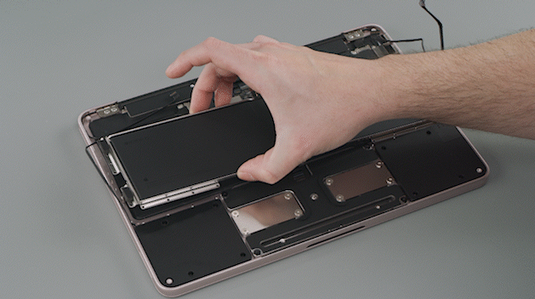
Photo Credit: Apple, Inc. (MacBook Neo Battery Replacement)
It is great to be able to replace a battery with only a screwdriver or two and a black stick, again. Hooray!
Apple Replacement Options
When the MacBook Neo battery no longer holds a sufficient charge, you always have the option of turning over the entire notebook to Apple to have the battery replaced.
The "estimated" price varies by location -- it starts at US$149 in the US -- but those who live near an Apple Store may choose to have the battery replaced the same day with an appointment or opt for service by mail which takes 3-4 days.
Self-Replacement Options
To replace the MacBook Neo battery, Apple provides official, easy-to-follow instructions to both remove the bottom of the case and swap out the battery itself that definitely should be reviewed in detail before embarking on self-replacement.
You likely will find this unofficial video from Worth It Repairs helpful, too:
The fact that the MacBook Neo battery swap procedure is straightforward also means that replacement should be easy for a quality independent repair shop and self-replacement is quite feasible for those with some experience, as well.
By reviewing the written instructions and watching the video for the MacBook Neo, you can decide whether or not you feel comfortable going the do-it-yourself route or if you would prefer to hire a pro.
Site sponsor OWC sells replacement batteries for the full range of Mac notebooks.
Permalink | Report an Error/Typo | Sign Up for Site Update Notices
Established in 1996, EveryMac.com has been created by experts with decades of experience with Apple hardware. EveryMac.com includes, and always has included, original research incorporating detailed, hands-on inspection of packaging, computers, and devices as well as extensive real-world use. All information is provided in good faith, but no website or person is perfect. Accordingly, EveryMac.com is provided "as is" without warranty of any kind whatsoever. EveryMac.com, and the authors thereof, shall not be held responsible or liable, under any circumstances, for any damages resulting from the use or inability to use the information within. For complete disclaimer and copyright information please read and understand the Terms of Use and the Privacy Policy before using EveryMac.com. Copying, scraping, or use of any content without expressed permission is not allowed, although links to any page are welcomed and appreciated.