
Hosted by site sponsor WebMate.
MacBook Pro PROLED XDR Q&A
Published November 24, 2026
All Mac Q&As >> MacBook Pro PROLED XDR Q&A (Home)
To be notified of new Q&As, sign up for EveryMac.com's bimonthly email list.
What are all the differences between the MacBook Pro PROLED XDR "M5 Pro/M5 Max" and the "regular" MacBook Pro "M5 Pro/M5 Max"? Is the touchscreen the big difference?
There are three stock "regular" "2026" 14" MacBook Pro "M5 Pro/M5 Max" models -- the MacBook Pro M5 Pro" 15 CPU/16 GPU 14", "M5 Pro" 18 CPU/20 GPU 14", and "M5 Max" 18 CPU/32 GPU 14" -- and three stock "regular" "2026" 16" MacBook Pro "M5 Pro/M5 Max" models -- the MacBook Pro "M5 Pro" 18 CPU/20 GPU 16", "M5 Max" 18 CPU/32 GPU 16", and "M5 Max" 18 CPU/40 GPU 16".
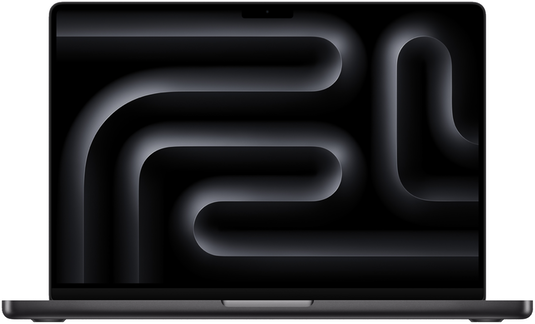
Photo Credit: Apple, Inc. (14" Black "Regular" MacBook Pro)
There also are three stock "2026" 14" MacBook Pro PROLED XDR models -- the MacBook Pro "M5 Pro" 15 CPU/16 GPU 14" OLED, "M5 Pro" 18 CPU/20 GPU 14" OLED, and "M5 Max" 18 CPU/32 GPU 14" OLED -- and three standard "2026" 16" MacBook Pro PROLED XDR models -- the MacBook Pro "M5 Pro" 18 CPU/20 GPU 16" OLED, "M5 Max" 18 CPU/32 GPU 16" OLED, and "M5 Max" 18 CPU/40 GPU 16" OLED.
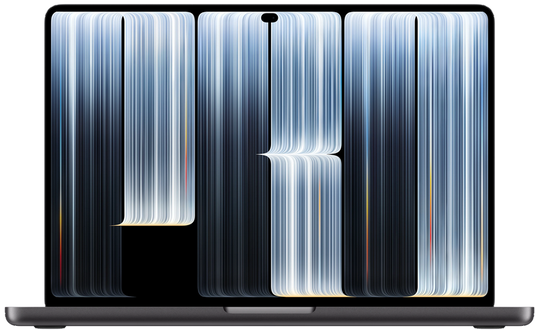
Photo Credit: Apple, Inc. (14" Black MacBook Pro PROLED XDR)
If you are a details-oriented person, it is already apparent that these two lines share processors and graphics processors from EveryMac.com's unofficial names alone.
MacBook Pro Market Strategy
Unusually, when Apple introduced the newer MacBook Pro PROLED XDR models, the company did not discontinue the older "regular" MacBook Pro, but rather continued to sell both lines at the same time.
The touchscreen is one significant difference, but the biggest difference is really the display quality.
For the first time on a Mac, the MacBook Pro PROLED XDR models use tandem OLED for much improved brightness, contrast, and color accuracy over the Mini-LED based displays used by the earlier notebooks.
It also is worth noting that Apple has emphasized screen quality for the MacBook Pro PROLED XDR -- from its unwieldy name alone -- rather than touch capability. Perhaps the company remembers the relative unpopularity of the MacBook Pro "Touch Bar" models from a few years ago and does not want to over promote the touchscreen as it is widely considered to be a "nice to have" feature rather than an essential one.
By not immediately discontinuing the older "regular" MacBook Pro models, Apple also has hedged its bets. If the older models continue to sell well or better -- they still cost much less -- maybe a touchscreen remains a niche feature on the Mac. Alternately, if the newer MacBook Pro PROLED XDR models sell well, perhaps the touchscreen finds its way down the price curve until all new Mac notebooks have touch displays or the line is supplanted by devices closer in capability, if not name, to the iPad. We will see in the coming years.
So what is the main difference between the "regular" "2026" MacBook Pro and the "2026" MacBook Pro PROLED XDR?
The short answer is these Mac notebooks are the same speed and share many of the same specs, but in addition to the better quality, touch-capable display, the MacBook Pro PROLED XDR borrows the "Dynamic Island" feature from the iPhone to better camouflage the webcam and sensors at the top of the display, are significantly lighter, and have a new sound system.
Of course, there are a number of different identifiers. It is worthwhile to understand the similarities, too.
External Differences
All of these MacBook Pro models use "sealed" aluminum and glass cases with silver and "Space Black" color options. Naturally, the 16" models from each line are larger and heavier than their smaller 14" contemporaries, but the 14" and 16" MacBook Pro PROLED XDR models are about half a pound and 0.7 of pound lighter than the earlier 14" and 16" models, respectively. The newer models are a little thinner, too, but the weight reduction is impressive.
In terms of specific display differences, the "regular" MacBook Pro models have LED-backlit "Liquid Retina XDR" displays -- 14.2" (3024x1964) and 16.2" (3456x2234). The 14" and 16" MacBook Pro PROLED XDR models, on the other hand, have even nicer touch-capable tandem OLED "PROLED XDR" displays -- 14.2" (3024x1986) and 16.3" (3472x2266). The MacBook Pro PROLED XDR displays have increased brightness and contrast as well as add support for Adobe RGB Wide color.
All of these models also include the same 12 megapixel "Center Stage" camera mounted in the upper frame of the display -- tucked in a "notch" for the earlier models and in a "Dynamic Island" for the later ones. They likewise all have the same all black, backlit keyboard set in a black background with "traditional" function keys as well as a "Touch ID" for login, and big "Force Touch" trackpads.
Finally, all of these MacBook Pro models have a "Studio-quality three-mic array with high signal-to-noise ratio and directional beamforming" as well as "Voice Isolation and Wide Spectrum" modes for enhanced voice clarity, and "high-fidelity six-speaker sound system with force-cancelling woofers." Again, Apple reports that the newer models have an all-new sound system with "50% deeper" base and improved clarity, too.
Connectivity Differences
Connectivity is nearly the same for the "regular" "2026" MacBook Pro and MacBook Pro PROLED XDR lines.
All of these notebooks have three Thunderbolt 5 ports (120 Gb/s) -- the PROLED XDR models add "Genlock" support -- an HDMI port, a 3.5" analog headphone jack "with advanced support for high-impedance headphones," an SDXC-capable SD card slot, and a magnet-equipped "MagSafe 3" power connector. They also all support Wi-Fi 7 and Bluetooth 6.
External display support is excellent for all of these notebooks, and formally varies a bit in terms of some supported options between the two lines, but in general, all of these MacBook Pro models with "M5 Pro" models support three 6K displays and those with "M5 Max" models support four 6K displays.
Likewise, power also is modestly different. By default, the entry-level options for both lines are bundled with a 70W USB-C power adapter that is not capable of fast charging.
Higher-end 14" models from both lines ship with a 96W USB-C power adapter that is capable of fast charging and the 16" models all ship with a 140W USB-C power adapter that also is capable of fast charging.
Identification Differences
It is very easy to confuse the "regular" "2026" MacBook Pro and MacBook Pro PROLED XDR models with each other and any number of other Mac notebooks. Accordingly, specific identifiers are critical for identification.
The easiest identifiers to use for these specific models are the Model Numbers, externally, and Model Identifiers in software.
Just as the site has done for decades, EveryMac.com diligently has hand documented all of these details from the notebooks themselves for your convenience:
MacBook Pro Models |
Model No |
Model ID |
Additionally, EveryMac.com's Ultimate Mac Lookup feature can identify these notebooks by other information, too.
Internal Differences
Internally, although there are specific part differences, the "regular" "2026" MacBook Pro and MacBook Pro PROLED XDR models use performance related components that are identical; the CPU/GPU combos and even the default RAM and SSD configurations are identical.
The only difference is that the MacBook Pro PROLED XDR "M5 Max" models gain a 16 TB SSD custom configuration option at the time of purchase.
All of these notebooks have RAM and storage that is integrated and that cannot be upgraded after purchase.
Comparison Chart
The major differences between the "regular" "2026" MacBook Pro and MacBook Pro PROLED XDR models are summarized below. Please refer to the specs page for the model of interest for complete details:
| 14" 2026 | 16" 2026 | 14" XDR | 16" XDR | |
|---|---|---|---|---|
| Display Size: | 14.2" | 16.2" | 14.2" | 16.3" |
| Display Type: | Mini-LED | Mini-LED | OLED | OLED |
| Touch: | No | No | Yes | Yes |
| Resolution: | 3024x1964 | 3456x2234 | 3024x1986 | 3472x2266 |
| Architecture: | M5 Pro M5 Max |
M5 Pro M5 Max |
M5 Pro M5 Max |
M5 Pro M5 Max |
| Processor Cores: | 15-18 | 18 | 15-18 | 18 |
| Graphics Cores: | 16-40 | 20-40 | 16-40 | 20-40 |
| Std. RAM: | 24-36 GB* | 24-48 GB* | 24-48 GB* | 24-48 GB* |
| Max. RAM: | 64, 128 GB* | 64, 128 GB* | 64, 128 GB* | 64, 128 GB* |
| Std. Storage: | 1 TB, 2 TB | 1 TB, 2 TB | 1 TB, 2 TB | 1 TB, 2 TB |
| Max. Storage: | 8 TB† | 8 TB† | 8 TB† | 16 TB† |
| Thunderbolt: | 3 (TB 5) | 3 (TB 5) | 3 (TB 5) | 3 (TB 5) |
| Genlock: | No | No | Yes | Yes |
| Fast Charge: | No/Yes‡ | Yes | No/Yes‡ | Yes |
| Wi-Fi: | 7 | 7 | 7 | 7 |
| Bluetooth: | 6 | 6 | 6 | 6 |
| Webcam: | Notch | Notch | Dynamic Island | Dynamic Island |
| Weight; Lbs: | 3.5-3.56 | 4.7 | 3.0-3.1 | 4.0-4.1 |
| Model No: | A3426 A3427 |
A3428 A3429 |
A3468 A3375 |
A3469 A3376 |
| Model ID: | Mac17,9 Mac17,7 |
Mac17,8 Mac17,6 |
Mac17,13 Mac17,11 |
Mac17,12 Mac17,10 |
| Intro Price (US)♦: | US$2199 US$2599 US$2799 US$3599 |
US$2699 US$3099 US$3899 US$4399 |
US$2899 US$3699 US$4499 |
US$3399 US$3999 US$4799 US$5399 |
| Intro Price (CA)♦: | C$2999 C$3599 C$3899 C$4999 |
C$3599 C$4199 C$5399 C$6199 |
C$3999 C$5149 C$6299 |
C$5499 C$6399 C$7699 C$8699 |
| Intro Price (UK)♦: | £2199 £2599 £2799 £3599 |
£2699 £3099 £3899 £4399 |
£2899 £3699 £4499 |
£3399 £3999 £4799 £5399 |
| Intro Price (AU)♦: | A$3499 A$4099 A$4499 A$5799 |
A$4299 A$4899 A$6299 A$6999 |
A$4599 A$5799 A$6999 |
A$5499 A$6399 A$7699 A$8699 |
| Intro Price (SG)♦: | S$2999 S$3599 S$3899 S$5099 |
S$3649 S$4249 S$5449 S$6199 |
S$3999 S$5149 S$6299 |
S$4499 S$5399 S$6499 S$7499 |
* These MacBook Pro models can be custom configured with more RAM, but only at the time of initial purchase. The "M5 Pro" processor can support up to 64 GB of RAM. If configured with an "M5 Max" processor, the minimum RAM option is 36 GB and the maximum is 128 GB.
† All of these MacBook Pro models have storage that cannot be upgraded later.
‡ The entry-level models in both lines are not equipped with a power adapter capable of "Fast Charging" by default.
♦ Apple significantly increased the prices of the "regular" MacBook Pro models on June 25, 2026. Current prices are higher than these introductory prices.
For introductory pricing in dozens of other countries, see the "Global Prices" on the specs page for each Mac as well as the "By Global Original Prices" section of EveryMac.com.
Are the "2026" MacBook Pro PROLED XDR models a significant upgrade? Are the "regular" MacBook Pro models still worth considering?
Compared to their predecessors, the "2026" MacBook Pro PROLED XDR models (1) have a much nicer display, (2) include touchscreen capability, (3) are much lighter, and (4) pack a better sound system.
However, these MacBook Pro PROLED XDR models also are (5) more expensive and (6) are the same speed as the "regular" MacBook Pro models.
The "regular" MacBook Pro models definitely remain well worth consideration; they also have a nice enough display and provide the same performance at a lower price. Of course, for those interested in saving money, any number of other MacBook Pro models on the used market are well worth considering, too.
In the US, site sponsor Other World Computing sells used and refurb MacBook Pro models at bargain prices with free shipping, as well. On the other hand, if you need to sell a MacBook Pro, A+ BBB-rated Cash for Your Mac and GoRoostr will buy your older notebook with an instant quote and prompt payment.
In the UK, site sponsor Hoxton Macs sells used MacBook Pro models with a one-year warranty and free next day delivery throughout the UK.
Permalink | Report an Error/Typo | Sign Up for Site Update Notices
<< MacBook Pro PROLED XDR Q&A (Main) | All Mac Q&As
Established in 1996, EveryMac.com has been created by experts with decades of experience with Apple hardware. EveryMac.com includes, and always has included, original research incorporating detailed, hands-on inspection of packaging, computers, and devices as well as extensive real-world use. All information is provided in good faith, but no website or person is perfect. Accordingly, EveryMac.com is provided "as is" without warranty of any kind whatsoever. EveryMac.com, and the authors thereof, shall not be held responsible or liable, under any circumstances, for any damages resulting from the use or inability to use the information within. For complete disclaimer and copyright information please read and understand the Terms of Use and the Privacy Policy before using EveryMac.com. Copying, scraping, or use of any content without expressed permission is not allowed, although links to any page are welcomed and appreciated.