
Hosted by site sponsor WebMate.
MacBook Neo Q&A
Published April 30, 2026
All Mac Q&As >> MacBook Neo Q&A (Home)
To be notified of new Q&As, sign up for EveryMac.com's bimonthly email list.
What are all the differences between the MacBook Neo (A18 Pro, 2026) models?
As defined by EveryMac.com, there is a single MacBook Neo "A18 Pro" 6 CPU/5 GPU 13" released in 2026 and available in two modestly different configurations.
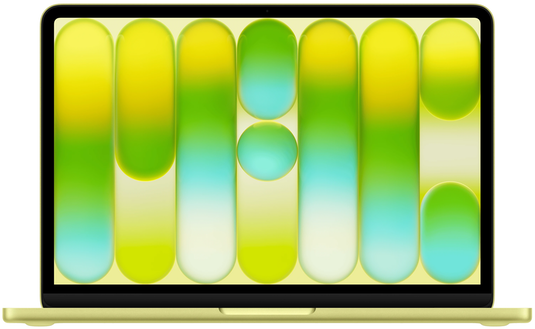
Photo Credit: Apple, Inc. (13" MacBook Neo 2026)
The shortest answer to this question is that the entry-level configuration of the MacBook Neo has a 256 GB SSD for US$599 and the higher-end configuration has a 512 GB SSD and a "Touch ID" sensor on the keyboard for US$699. There are a variety of different identifiers, too.
However, there are a large number of similarities that are important to understand, as well.
External Differences
With the exception of the "Lock Key" and round "Touch ID" sensor on the entry-level and higher-end configuration of the MacBook Neo, respectively, these configurations are visually identical.
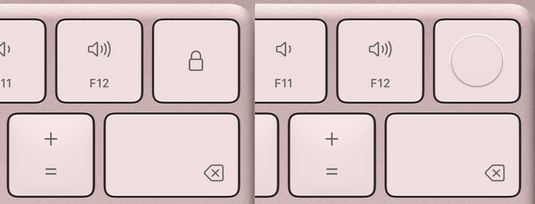
Photo Credit: Apple, Inc. (MacBook Neo - Left: Lock Key; Right: Touch ID)
Both keys are on the upper right corner of the MacBook Neo keyboard.
The entry-level "Lock Key" is used to lock and wake the display as well as turn the notebook on and off. The higher-end "Touch ID" doubles as a power button, but also makes it possible to use your fingerprint to unlock your Mac, sign into apps, and authorize online payments.
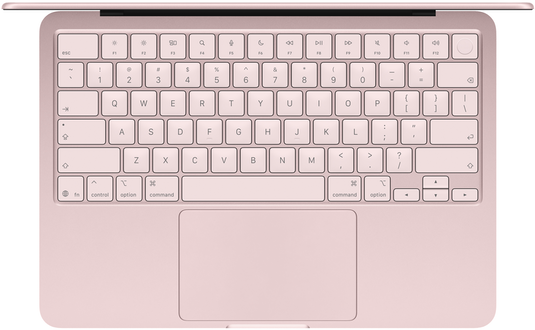
Photo Credit: Apple, Inc. (MacBook Neo - Keyboard)
All MacBook Neo models have the same dimensions -- 0.5 inches x 11.71 inches x 8.12 inches when closed and 2.7 lbs (1.23 kg) -- and all are offered in the same four color options -- silver, "Blush" (light pink), "Citrus" (yellow), and "Indigo" (dark blue).
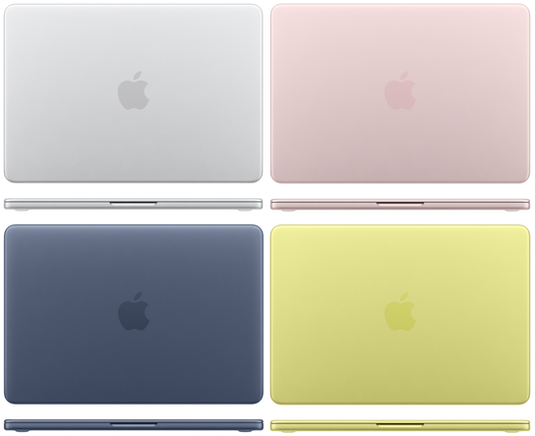
Photo Credit: Apple, Inc. (MacBook Neo Color Options)
All MacBook Neo models use the same 13.0" LED-backlit 2408x1506 (219 ppi, 500 nits) display with IPS technology. They all lack support for Wide color (P3) and the "True Tone" technology that automatically adjusts color temperature.
All MacBook Neo models also all have the same integrated 1080p "FaceTime HD" webcam, dual-speaker sound system, "Magic Keyboard" without backlit capability, "Multi-Touch" (not "Force Touch" trackpad), and the same modest connectivity -- two USB-C ports (one USB 2 speed up to 480 Mb/s and one USB 3 speed up to 10 Gb/s), 3.5 mm headphone jack, 802.11ax Wi-Fi 6E and Bluetooth 6.
The MacBook Neo USB 3 port supports a single external display up to 3840x2160 (4K) at 60 Hz.
The MacBook Neo models do not have a "MagSafe 3" power connector that disconnects cleanly if suddenly unplugged, either.
Identification Differences
As carefully hand documented from each notebook itself by EveryMac.com, these MacBook Neo configurations all share the same Model Number externally on the bottom case toward the hinge as well as the same EMC Number and Model Identifier in software.
Because it is easy to mix up the MacBook Neo models with any number of other similar looking Mac notebooks, these identifiers are sufficient to collectively identify this line:
| MacBook Neo | Model No. | EMC No. | Model ID |
| A18 Pro, 2026 | A3404 | 8984 | Mac17,5 |
EveryMac.com's Ultimate Mac Lookup feature can uniquely identify specific configurations of the MacBook Neo by Order Number and other identifiers, as well.
More information about specific identifiers is provided in EveryMac.com's extensive Mac Identification section.
Internal Differences
All MacBook Neo configurations are powered by a 4.0 GHz Apple A18 Pro processor with 6 CPU cores (2 performance cores and 4 efficiency cores), a 5-core GPU, a 16-core Neural Engine, 8 GB of "unified" default onboard RAM, and either a 256 GB or 512 GB onboard SSD.
All MacBook Neo models essentially are sealed and disposable with processors, graphics processors, RAM, and storage that cannot be custom configured with more capable options at the time of purchase or upgraded at all subsequently. The battery is easy to replace, though; a major improvement over other contemporary Mac notebooks.
Comparison Chart
The above differences between the MacBook Neo (A18 Pro, 2026) configurations -- storage and authentication -- as well as their default order numbers and starting prices -- are summarized below:
13" MacBook Neo (Entry-Level) vs. MacBook Neo (Touch ID)
| MacBook Neo 13" | Entry-Level | Touch ID |
| Display: | 13.0" | 13.0" |
| Resolution: | 2408x1506 | 2408x1506 |
| Processor: | Apple A18 Pro | Apple A18 Pro |
| Graphics: | 5 Cores | 5 Cores |
| Default RAM: | 8 GB | 8 GB |
| Max RAM: | 8 GB* | 8 GB* |
| Standard Storage: | 256 GB | 512 GB |
| Max Storage: | 256 GB* | 512 GB* |
| Touch ID: | No | Yes |
| USB 2: | 1 (USB-C) | 1 (USB-C) |
| USB 3: | 1 (USB-C) | 1 (USB-C) |
| Wi-Fi: | Wi-Fi 6E | Wi-Fi 6E |
| Bluetooth: | 6 | 6 |
| Ext. Displays: | 1 (4K) | 1 (4K) |
| Battery Life: | 11-16 Hours | 11-16 Hours |
| Battery W-Hr: | 36.5 W h | 36.5 W h |
| Dimensions: | 0.5 x 11.71 x 8.12 | 0.5 x 11.71 x 8.12 |
| Weight: | 2.7 lbs (1.23 kg) | 2.7 lbs (1.23 kg) |
| Order No: | MHFA4LL/A MHFH4LL/A MHFD4LL/A MHFF4LL/A |
MHFC4LL/A MHFJ4LL/A MHFE4LL/A MHFG4LL/A |
| Orig. Price (US): | US$599 | US$699 |
| Orig. Price (CA): | C$799 | C$999 |
| Orig. Price (UK): | £599 | £699 |
| Orig. Price (FR): | €699 | €799 |
| Orig. Price (AU): | A$899 | A$1099 |
| Orig. Price (SG): | S$849 | S$999 |
* Neither the RAM nor the storage can be custom configured with higher capacity options at the time of purchase. The RAM and storage cannot be upgraded later, either.
So, which MacBook Neo is for me?
Ignoring other Mac notebooks, EveryMac.com would suggest getting the higher-end MacBook Neo. The entry-level configuration with 256 GB of storage does not provide much headroom for those who do even basic student-level photo or video work. Because the external ports are slow, resorting to using external storage down the road likely would be less than ideal, too.
Should you consider the entry-level MacBook Neo, be very certain that the storage will be sufficient for your needs.
Additionally, if your interest in the MacBook Neo is simply that it is cheap, EveryMac.com would recommend that you strongly consider a used MacBook Air.
Used MacBook Air models from two or three years earlier -- like the MacBook Air M2 and MacBook Air M3 -- are faster than the MacBook Neo in multicore tasks, have much better connectivity, and more advanced features and yet are priced very competitively on the used market compared to the new MacBook Neo.
In the US, site sponsor Other World Computing sells used and refurb MacBook Air models at bargain prices with free shipping, as well. On the other hand, if you need to sell a MacBook Air, A+ BBB-rated Cash for Your Mac and GoRoostr will buy your older notebook with an instant quote and prompt payment.
In the UK, site sponsor Hoxton Macs sells used MacBook Air models with a one-year warranty and free next day delivery throughout the UK.
Permalink | Report an Error/Typo | Sign Up for Site Update Notices
Established in 1996, EveryMac.com has been created by experts with decades of experience with Apple hardware. EveryMac.com includes, and always has included, original research incorporating detailed, hands-on inspection of packaging, computers, and devices as well as extensive real-world use. All information is provided in good faith, but no website or person is perfect. Accordingly, EveryMac.com is provided "as is" without warranty of any kind whatsoever. EveryMac.com, and the authors thereof, shall not be held responsible or liable, under any circumstances, for any damages resulting from the use or inability to use the information within. For complete disclaimer and copyright information please read and understand the Terms of Use and the Privacy Policy before using EveryMac.com. Copying, scraping, or use of any content without expressed permission is not allowed, although links to any page are welcomed and appreciated.