
Hosted by site sponsor WebMate.
MacBook Neo Q&A
Published April 30, 2026
All Mac Q&As >> MacBook Neo Q&A (Home)
To be notified of new Q&As, sign up for EveryMac.com's bimonthly email list.
What are all the differences between the 13" MacBook Neo and also 13" MacBook Air? Why would anyone still buy a MacBook Air?
There is a single 13" MacBook Neo -- the MacBook Neo "A18 Pro" 6 CPU/5 GPU 13" -- and two standard 13" MacBook Air "M5" models -- the MacBook Air "M5" 10 CPU/8 GPU 13" and MacBook Air "M5" 10 CPU/10 GPU 13" -- all released in 2026.
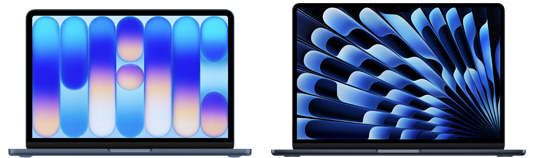
Photo Credit: Apple, Inc. (13" MacBook Neo & 13" MacBook Air M5)
To many users -- who historically only bought a MacBook Air because it was the cheapest new Mac notebook -- the MacBook Neo likely is good enough this time around. Starting at US$599, the MacBook Neo has a dramatically lower price tag; a whopping US$500 less than the US$1099 starting price of the MacBook Air "M5" line.
Accordingly, it is inevitable that the MacBook Neo will cannibalize sales of the MacBook Air in addition to sales of iPad models. Presumably, Apple has calculated that the lower price of the MacBook Neo will increase sales volume so much that its success will far more than offset the decline in sales of the MacBook Air and iPad.
With that said, although the two notebooks look similar with a casual glance, there actually are a large number of differences. To those with relatively demanding needs -- and an adequate budget -- some combination of the vastly better performance, superior capabilities, and additional features provided by the 13" MacBook Air "M5" will be well worth the extra money and very much reasons to still buy one over the MacBook Neo.
Determining which differences are valuable to you, though, requires a proper in-depth evaluation.
External Housing Differences
The chassis size of the 13" MacBook Neo and 13" MacBook Air "M5" models are highly similar.
Both essentially are the same weight (2.7 lbs), with the MacBook Neo case measuring 0.5 inches x 11.71 inches x 8.12 inches when closed and the 13" MacBook Air "M5" a little thinner but a little wider and deeper -- 0.44 inches x 11.97 inches x 8.46 inches when closed.
Color options are mostly different, as well. Both are offered in silver, but otherwise differ.
The MacBook Neo is available in silver, "Blush" (light pink), "Citrus" (yellow), and "Indigo" (dark blue).
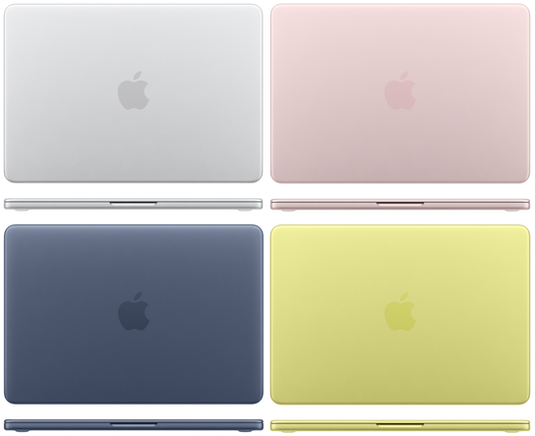
Photo Credit: Apple, Inc. (MacBook Neo Color Options)
The MacBook Air "M5" is available in more subdued colors -- silver, pale blue-silver "Sky Blue", warm gray "Starlight", and a very dark blue "Midnight" color that is much darker than the Indigo offering for the MacBook Neo.
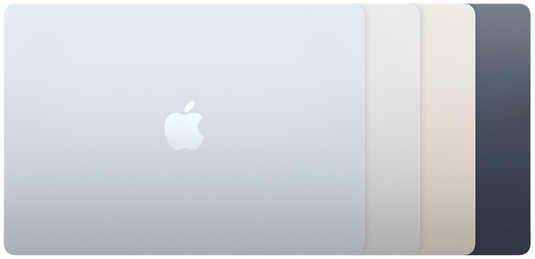
Photo Credit: Apple, Inc. (MacBook Air "M5" Color Options)
Display Differences
Although the MacBook Neo and MacBook Air are both casually considered to have 13" displays, the MacBook Air display actually is a bit bigger. It also has better feature support.
The MacBook Neo has a 13.0" LED-backlit 2408x1506 (219 ppi, 500 nits) display with IPS. It does not support Wide color (P3) and "True Tone" technology.
The 13" MacBook Air "M5", by contrast, has a larger 13.6" LED-backlit 2560x1664 (224 ppi, 500 nits) display with IPS. It does support Wide color (P3) and "True Tone."
Feature Differences
The MacBook Neo has a 1080p "FaceTime HD" webcam, dual-speaker sound system, "Magic Keyboard" without backlit capability, and "Multi-Touch" trackpad that physically clicks. Higher-end US$699 configurations include a "Touch ID" sensor integrated with the power button.
The 13" MacBook Air "M5", on the other hand, bests all of these features. It has a 12 megapixel 1080p "Center Stage" webcam that automatically tracks and zooms to keep subjects in frame with "Desk View" support. It has a four speaker sound system, backlit "Magic Keyboard" with ambient light sensor, large "Force Touch" trackpad with more diverse gesture support and pressure sensitivity, and Touch ID standard.
Connectivity Differences
The MacBook Neo has feeble connectivity compared to the 13" MacBook Air "M5". They both support Bluetooth 6, but otherwise differ significantly.
The MacBook Neo has two USB-C ports (one USB 2 speed up to 480 Mb/s and one USB 3 speed up to 10 Gb/s), a 3.5 mm headphone jack, and 802.11ax Wi-Fi 6E. It does not have a "MagSafe 3" connector that disconnects cleanly if the power cable is yanked suddenly; one of the USB-C ports must be used for charging (the USB 2 port is preferable).
However, the 13" MacBook Air "M5" has two much faster Thunderbolt 4-capable USB-C ports (up to 40 Gb/s), a 3.5 mm headphone jack with "advanced support for high-impedance headphones," and newer 802.11be Wi-Fi 7. It also has a dedicated "MagSafe 3" power connector.
The MacBook Neo USB 3 port supports a single external display up to 3840x2160 (4K) at 60 Hz, whereas the 13" MacBook Air "M5" is massively more capable -- supporting "up to" two 6016x3384 (6K) external displays at 60 Hz, two 3840x2160 (4K) displays at 144 Hz, one 7680x4320 (8K) external display at 60 Hz, one 5120x2880 (5K) external display at 120 Hz, or one 3840x2160 (4K) external display at 240 Hz.
Identification Differences
As carefully hand documented from each notebook itself by EveryMac.com, the MacBook Neo and 13" MacBook Air "M5" models have different Model Numbers, EMC Numbers, and Model Identifiers.
Model Numbers are external on the bottom case toward the hinge; EMC Numbers and Model Identifiers are in software.
These identifiers are a fairly reliable way to differentiate between these notebook lines and others for the long-term, too:
| MacBook | Model No. | EMC No. | Model ID |
| Neo A18 Pro | A3404 | 8984 | Mac17,5 |
| Air M5 13" | A3449 | 8877 | Mac17,3 |
EveryMac.com's Ultimate Mac Lookup feature can uniquely identify each of these Mac notebooks by other identifiers, as well.
More information about specific identifiers is provided in EveryMac.com's extensive Mac Identification section.
Internal Differences
Although both models essentially are sealed and disposable with processors, graphics processors, RAM, and storage that cannot be upgraded, the 13" MacBook Neo and 13" MacBook Air "M5" otherwise have little in common internally. Both have batteries that are straightforward to replace, but the MacBook Neo is easier.
The MacBook Neo has a 4.0 GHz Apple A18 Pro processor with 6 CPU cores (2 performance cores and 4 efficiency cores), a 5-core GPU, a 16-core Neural Engine, 8 GB of "unified" onboard RAM, and either a 256 GB or 512 GB onboard SSD.
The 13" MacBook Air "M5" models are better across the board with a 4.4 GHz Apple M5 processor with 10 cores (4 "super" cores and 6 efficiency cores), an 8-core or 10-core GPU, a 16-core Neural Engine, 16 GB of "unified" onboard RAM, and a 512 GB or 1 TB onboard SSD.
In overall performance, the 13" MacBook Air "M5" is about 20% faster in single core tasks, 95% faster in multicore tasks, and at least 114% faster in graphics tasks than the MacBook Neo. In terms of speed, the MacBook Air "M5" clearly cleans the floor with the MacBook Neo.
Comparison Chart
The above differences between the 13" MacBook Neo and 13" MacBook Air "M5" models -- displays, features, processors, graphics, speakers, external display support, wireless capabilities, identifiers, dimensions, weight, and starting prices -- are summarized below:
13" MacBook Neo vs. 13" MacBook Air "M5"
| MacBook | Neo 13" | Air M5 13" |
| Display: | 13.0" | 13.6" |
| Resolution: | 2408x1506 | 2560x1664 |
| Wide Color: | No | Yes |
| True Tone: | No | Yes |
| Speaker System: | 2 Speakers | 4 Speakers |
| Webcam: | 1080p | 1080p (12 MP) |
| Center Stage: | No | Yes |
| Keyboard: | Not Backlit | Backlit |
| Trackpad: | Multitouch | Force Touch |
| Clockspeed: | 4.0 GHz | 4.4 GHz |
| Processor: | Apple A18 Pro | Apple M5 |
| CPU Cores: | 6 Cores | 10 Cores |
| GPU Cores: | 5 Cores | 8/10 Cores |
| Default RAM: | 8 GB | 16, 24 GB |
| Max RAM: | 8 GB | 32 GB* |
| Standard Storage: | 256, 512 GB | 512 GB, 1 TB |
| Max Storage: | 512 GB | 4 TB* |
| USB-C: | 2 (USB 2, 3) | 2 (Thunderbolt 4) |
| Touch ID: | No/Yes | Yes |
| MagSafe 3: | No | Yes |
| Wi-Fi: | Wi-Fi 6E | Wi-Fi 7 |
| Bluetooth: | 6 | 6 |
| Ext. Displays: | 1 | 2** |
| Battery Life: | 11-16 Hours | 15-18 Hours |
| Battery W-Hr: | 36.5 W h | 52.6 W h |
| Dimensions: | 0.5 x 11.71 x 8.12 | 0.44 x 11.97 x 8.46 |
| Weight: | 2.7 lbs (1.23 kg) | 2.7 lbs. (1.24 kg) |
| Colors: | Silver Blush Citrus Indigo |
Silver Sky Blue Starlight Midnight |
| Model ID: | Mac17,5 | Mac17,3 |
| Orig. Price (US): | US$599 US$699 |
US$1099 US$1299 US$1499 |
| Orig. Price (CA): | C$799 C$999 |
C$1499 C$1799 C$2099 |
| Orig. Price (UK): | £599 £699 |
£1099 £1299 £1499 |
| Orig. Price (FR): | €699 €799 |
€1199 €1449 €1699 |
| Orig. Price (AU): | A$899 A$1099 |
A$1799 A$2099 A$2399 |
| Orig. Price (SG): | S$849 S$999 |
S$1599 S$1899 S$2199 |
* The 13" MacBook Air "M5" can be configured with additional RAM and storage at the time of initial purchase. The RAM and storage cannot be upgraded later.
** The 13" MacBook Air "M5" supports full native resolution on the interior display and either "up to" two 6016x3384 (6K) external displays at 60 Hz, two 3840x2160 (4K) displays at 144 Hz, one 7680x4320 (8K) external display at 60 Hz, one 5120x2880 (5K) external display at 120 Hz, or one 3840x2160 (4K) external display at 240 Hz.
So, is the 13" MacBook Neo or 13" MacBook Air "M5" best for me?
With a detailed evaluation, it becomes clear that although the MacBook Neo is US$500 cheaper, the 13" MacBook Air is nearly twice the speed in multicore tasks. If performance matters to you, and you have the budget, it really is no contest -- get the MacBook Air.
In addition to being much faster, the 13" MacBook Air "M5" also has (1) a bigger, better display, (2) better speakers, (3) a better webcam, (4) a backlit keyboard, (5) a more capable trackpad, (6) twice the RAM, (7) more storage, (8) better connectivity, (9) much better external display support, and (10) better battery life. For those who can afford it, this clearly is a lot of additional value for an extra US$500.
Accordingly, the MacBook Neo really only is worth considering for someone on a tight budget, who only needs basic performance, and who either does not need or is willing to sacrifice the additional benefits of the MacBook Air to save money.
For those on a limited budget, EveryMac.com also would highly recommend that you consider a used MacBook Air.
A used MacBook Air from two or three years earlier -- like a MacBook Air M2 or MacBook Air M3 -- are faster than the MacBook Neo in multicore tasks, have much better connectivity, and more advanced features and yet are priced very competitively on the used market compared to the new MacBook Neo.
In the US, site sponsor Other World Computing sells used and refurb MacBook Air models at bargain prices with free shipping, as well. On the other hand, if you need to sell a MacBook Air, A+ BBB-rated Cash for Your Mac and GoRoostr will buy your older notebook with an instant quote and prompt payment.
In the UK, site sponsor Hoxton Macs sells used MacBook Air models with a one-year warranty and free next day delivery throughout the UK.
Permalink | Report an Error/Typo | Sign Up for Site Update Notices
Established in 1996, EveryMac.com has been created by experts with decades of experience with Apple hardware. EveryMac.com includes, and always has included, original research incorporating detailed, hands-on inspection of packaging, computers, and devices as well as extensive real-world use. All information is provided in good faith, but no website or person is perfect. Accordingly, EveryMac.com is provided "as is" without warranty of any kind whatsoever. EveryMac.com, and the authors thereof, shall not be held responsible or liable, under any circumstances, for any damages resulting from the use or inability to use the information within. For complete disclaimer and copyright information please read and understand the Terms of Use and the Privacy Policy before using EveryMac.com. Copying, scraping, or use of any content without expressed permission is not allowed, although links to any page are welcomed and appreciated.