
Hosted by site sponsor WebMate.
iPhone Q&A
Update Published October 24, 2026
All Apple Q&As >> iPhone Q&A (Home)
To be notified of new Q&As, sign up for EveryMac.com's bimonthly or so email list.
How can you take photos or shoot video with the iPhone and save directly to external storage? Is it even possible?
Starting with the iPhone 15 Pro and iPhone 15 Pro Max, Apple added the capability to shoot video in ProRes format up to 4K at 120 fps and save this footage directly to specific, compatible external storage. Later and current iPhone Pro models also have this capability (a full list of compatible iPhone models is below).
For professional and prosumer videographers -- or simply anyone who shoots a lot of video -- adding official capability to record directly to external storage has been a game changer; it is much more convenient to move video to a Mac or iPad for processing and editing in addition to organization and archival purposes. The days of worrying about running out of storage during a shoot are over, as well.
Apple does not provide formal support for shooting still photos directly to external storage on these iPhone models, but the third-party Photon app adds this capability, and it works well in our experience.
If there are other third-party apps that you have used to shoot still photos or video directly to external storage and you have been happy with the results, please share.
iPhones Capable of Recording to External Storage (Skip)
All compatible iPhone Pro models along with their default internal storage options:

Remember that if you need help identifying a specific iPhone, EveryMac.com's Ultimate iLookup feature makes it easy to precisely identify each iPhone by Model Number and Order Number and by other identifiers, too. iPhone Identification may be helpful, as well.
External iPhone Storage for Direct Video Recording
These iPhone Pro models all support the ProRes video format and have a USB-C port that is USB 3 (10 Gbps) capable.
To properly record video directly to the external drive from the iPhone, the external storage needs to have a write speed of at least 220 MB/second for 4K60 ProRes and at least 440 MB/second for 4K120 ProRes. The drive also needs to be formatted in exFAT format and use a USB-C cable that is USB 3 (10 Gbps) or faster.
Good external storage options for this purpose include these drives from site sponsor Other World Computing and from Lexar, which does not sponsor EveryMac.com, but really should.
The two quality, durable options from OWC include the small Envoy Pro mini and larger, but still compact, Envoy Pro Elektron.
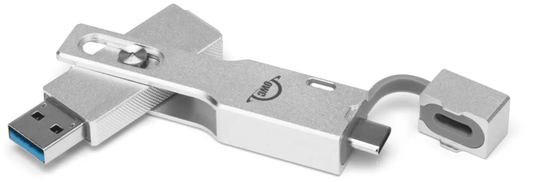
Photo Credit: OWC (Envoy Pro mini)
The OWC Envoy Pro mini is designed to be carried or worn on a lanyard, has a write speed of 946 MB/second, capacities up to 2 TB, and has both USB-A and USB-C ports, so it is especially easy to transfer photos or video to just about any computer for editing or archiving.
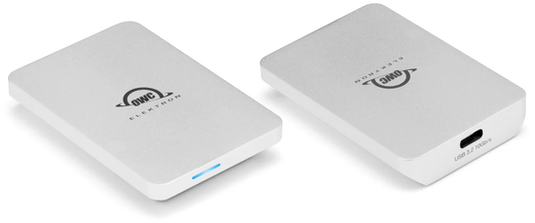
Photo Credit: OWC (Envoy Pro Elektron; Front & Back)
The larger, but still pocketable -- and waterproof -- OWC Envoy Pro Elektron is faster with write speeds up to 1011 MB/second, capacities up to 4 TB, and a USB-C port that can be used with your choice of removable cables.
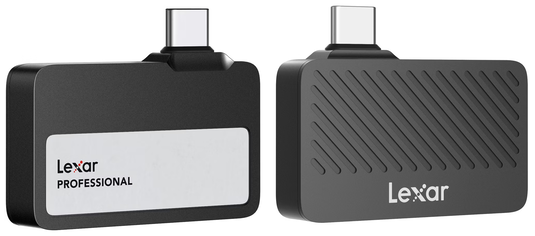
Photo Credit: Lexar (Lexar Professional Go Portable)
We like the small size and compact shape of the Lexar Professional Go Portable, and it has write speeds up to 1000 MB/second, as well.
Unfortunately, it is only compatible with the iPhone 15 Pro/iPhone 15 Pro Max and iPhone 16 Pro/iPhone 16 Pro Max (and not newer iPhone Pro models). It is not as durable as the OWC options, either.
iPhone Video & Photos Direct to External Storage Summary
It definitely is more straightforward to stay organized on a shoot by recording video or saving photos directly to external storage, especially on a project-by-project basis when editing is involved, rather than retroactively trying to move photos and videos from your iPhone to external storage later. It is hoped this will make your life easier.
Site sponsor OWC sells the rugged Envoy Pro mini and Envoy Pro Elektron.
<< iPhone Q&A (Main) | iPhone Specs
Established in 1996, EveryMac.com has been created by experts with decades of experience with Apple hardware. EveryMac.com includes, and always has included, original research incorporating detailed, hands-on inspection of packaging, computers, and devices as well as extensive real-world use. All information is provided in good faith, but no website or person is perfect. Accordingly, EveryMac.com is provided "as is" without warranty of any kind whatsoever. EveryMac.com, and the authors thereof, shall not be held responsible or liable, under any circumstances, for any damages resulting from the use or inability to use the information within. For complete disclaimer and copyright information please read and understand the Terms of Use and the Privacy Policy before using EveryMac.com. Copying, scraping, or use of any content without expressed permission is not allowed. Links to any page are welcomed and appreciated.