
Hosted by site sponsor WebMate.
Apple Silicon Mac mini Q&A
Update Published October 1, 2026
All Mac Q&As >> Apple Silicon Mac mini Q&A (Home)
To be notified of new Q&As, sign up for EveryMac.com's bimonthly email list.
What type of internal storage does the Apple Silicon Mac mini use? Is it possible to upgrade it?
Default, custom configuration options, and upgradablilty for internal storage in the Apple Silicon Mac mini line varies depending on the specific model.
Apple Silicon Mac mini M1 (2020) & M2/M2 Pro (2023)
As confirmed by teardowns of the Apple Silicon Mac mini M1 (2020) and M2/M2 Pro (2023) models, internal storage is onboard and it is not possible to upgrade it after the initial purchase of the computer.
For those holding out hope that faster Mac mini models at least would have storage on a removable module like the Mac Studio, it was disappointing.
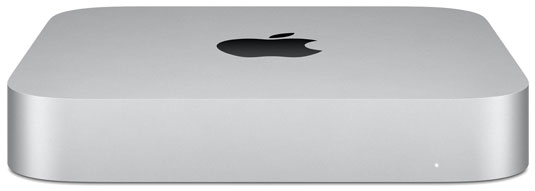
Photo Credit: Apple, Inc. (Apple Silicon Mac mini)
These Apple Silicon Mac mini models could be upgraded with more storage than the default at the time of initial purchase, though:
Apple Silicon Mac mini |
Default SSDs |
SSD Options |
256 GB, 512 GB |
1 TB, 2 TB |
|
256 GB, 512 GB |
1 TB, 2 TB |
|
512 GB |
1 TB, 2 TB, 4 TB, 8 TB |
|
512 GB |
1 TB, 2 TB, 4 TB, 8 TB |
Apple Silicon Mac mini M4/M4 Pro (2024)
In a pleasant surprise, a teardown of the Apple Silicon Mac mini M4/M4 Pro (2024) determined that the SSD storage is provided on a removable module that is similar, but not identical, to the earlier Mac Studio.
In a ballsy experiment, the legendary "DOS Dude" was able to successfully remove the original storage on a then brand new Mac mini "M4" 10 CPU/10 GPU 2024 module with a heat gun, resolder larger capacity, blank NAND storage (K6B2) onto the module, and then restore the Mac mini M4 operating system in DFU (Device Firmware Update) mode:
Of course, this is well beyond the capabilities, or even equipment, of the typical Mac upgrade customer, but it was extremely impressive work and boded well for more "plug and play" NAND storage modules becoming available.
For mere mortals, the Apple Silicon Mac mini M4/M4 Pro models also could be configured with more storage at the time of initial purchase:
Apple Silicon Mac mini |
Default SSDs |
SSD Options |
256 GB, 512 GB |
1 TB, 2 TB |
|
512 GB |
1 TB, 2 TB, 4 TB, 8 TB |
|
512 GB |
1 TB, 2 TB, 4 TB, 8 TB |
Apple Silicon Mac mini M5 Pro/M6 (2026)
Sadly, for the current Apple Silicon Mac mini M5 Pro/M6 (2026) models, Apple again soldered the NAND onto the logic board.
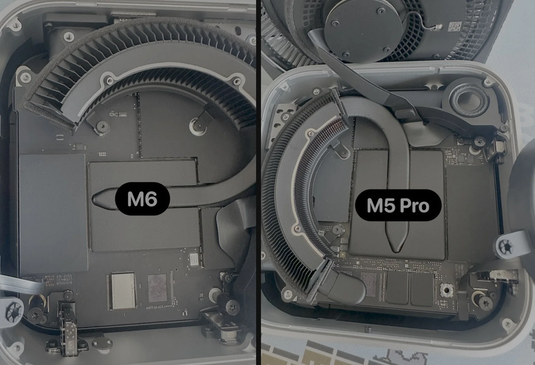
Photo Credit: Expand Mac mini (Apple Silicon Mac mini SSD Storage)
This is an especially disappointing move because the internals of the Mac mini M5 Pro/M6 models are otherwise so similar to their predcessors with removable NAND storage modules. There certainly seems to be no reason to do this except to eliminate upgrades and shorten the useful life of the computer.
It still is possible to configure the Apple Silicon Mac mini M5 Pro/M6 models with more storage at the time of initial purchase:
Apple Silicon Mac mini |
Default SSDs |
SSD Options |
512 GB |
1 TB, 2 TB, 4 TB, 8 TB |
|
512 GB |
1 TB, 2 TB, 4 TB, 8 TB |
|
256, 512 GB |
1 TB, 2 TB |
The last Mac mini models to have easy-to-upgrade internal storage were the "Late 2014" Mac mini line.
Also see: What external storage options are available for the Apple Silicon Mac mini? Which is the best?
Permalink | Report an Error/Typo | Sign Up for Site Update Notices
Suggest a New Q&A | Sign Up for Bimonthly Site Update Notices
<< Apple Silicon Mac mini Q&A (Main) | All Mac Q&As
Established in 1996, EveryMac.com has been created by experts with decades of experience with Apple hardware. EveryMac.com includes, and always has included, original research incorporating detailed, hands-on inspection of packaging, computers, and devices as well as extensive real-world use. All information is provided in good faith, but no website or person is perfect. Accordingly, EveryMac.com is provided "as is" without warranty of any kind whatsoever. EveryMac.com, and the authors thereof, shall not be held responsible or liable, under any circumstances, for any damages resulting from the use or inability to use the information within. For complete disclaimer and copyright information please read and understand the Terms of Use and the Privacy Policy before using EveryMac.com. Copying, scraping, or use of any content without expressed permission is not allowed, although links to any page are welcomed and appreciated.