
Hosted by site sponsor WebMate.
macOS Golden Gate (macOS 27) Q&A
Update Published September 27, 2026
To be notified of new Q&As, sign up for EveryMac.com's bimonthly or so email list.
Which Macs are compatible with macOS Golden Gate (macOS 27)? Do all features work with all supported Macs?
Apple initially previewed macOS Golden Gate -- also dubbed macOS 27 in reference to 2027 -- on June 8, 2026. A public beta was released on July 13, 2026 and the final version was released on September 14, 2026.
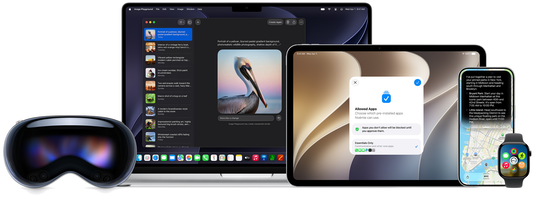
Photo Credit: Apple, Inc.
In what seems to quietly demonstrate likely further consolidation between the company's operating systems, Apple's official press release and promo photography tends to focus on shared services and features across their product line rather than individual operating systems on specific devices as was common in years past.
Just like all other versions of the macOS for many years now, macOS Golden Gate is free and only formally available to upgrade or install via Apple's own processes.
New macOS Golden Gate Features
For macOS Golden Gate, and Apple's other simultaneously updated operating systems like iOS 27 and iPadOS 27, the company focused on three major items -- (1) new versions of Apple Intelligence and Siri, (2) trust and safety, and (3) platform improvements.
The corporate press release explains further that:
Apple previewed its upcoming software releases that will deliver the next generation of Apple Intelligence and introduce Siri AI, an entirely new version of Siri that is profoundly more intelligent, knowledgeable, and capable. The releases also bring powerful and intuitive new features to help parents create safe digital experiences for kids, as well as improvements that further elevate the software design and performance of Apple products while making them more responsive, delightful, and easier to use with iOS 27, iPadOS 27, macOS 27, watchOS 27, visionOS 27, and tvOS 27.
This could be interpreted as a subtle acknowledgement that Apple Intelligence and Siri could be better and some of the "Liquid Glass" interface changes introduced by macOS Tahoe (macOS 26) were awkward and not as well received as the company would have liked.
Nevertheless, improvements always are welcomed, especially when it comes to speed and ease-of-use.
macOS Golden Gate Discards the Past
On the other hand, where Apple giveth, Apple also taketh away.
As Apple promised last year, macOS Golden Gate only supports Macs with Apple Silicon processors. Intel Macs are not supported at all; it is the end of an era.
macOS Golden Gate likewise is the last version of the macOS to support the Rosetta 2 translation environment that makes it possible to run many 64-bit Intel Mac apps on Apple Silicon Macs.
Accordingly, if you still have mission critical software from the 64-bit Intel Mac era that was not upgraded, macOS Golden Gate will be your last chance to use it. Going forward, you will have to decide whether to try and find a newer substitute app, maintain a "legacy" Mac for use of your older software, or in some cases, switch to Windows.
macOS Golden Gate System Requirements
In marketing copy and technical documentation, Apple specifies that macOS Golden Gate is compatible with these Macs:
- MacBook Neo (2026)
- MacBook Air with Apple Silicon (2020 and later)
- MacBook Pro with Apple Silicon (2020 and later)
- iMac with Apple Silicon (2021 and later)
- Mac mini with Apple Silicon (2020 and later)
- Mac Studio (2022 and later)
- Mac Pro with Apple Silicon (2023 and later)
Feature compatibility is uniform across the line, except, as buried in fine print, support for the "most powerful on-device model" of Apple Intelligence, which enables expressive Siri voices and more advanced dictation, is limited to Macs with an M3 processor or higher and at least 12 GB of RAM.
Compared to the previous version of the macOS -- macOS Tahoe (macOS 26) -- macOS Golden Gate drops support for the small number of Intel Macs that were still supported:
- MacBook Pro 13-Inch (2020, Four Thunderbolt 3 Ports)
- MacBook Pro 16-Inch (2019)
- iMac (2020)
- Mac Pro (2019)
Identification Help
If you're not sure if your Mac will run macOS Golden Gate (macOS 27), each of the supported computers can be identified by the above "subfamily" designations in addition to the Model Identifier in software. More details about specific identifiers are provided in EveryMac.com's extensive Mac Identification section.
To locate the Model Identifier, select "About This Mac" under the Apple Menu on your computer and click the "System Report" button.
EveryMac.com's Ultimate Mac Lookup feature also can pinpoint these Macs by a variety of other identifiers.
macOS Golden Gate (macOS 27) Supported Macs
Specifically, the following Macs are compatible with macOS Golden Gate:


If your Mac is not listed above, it is not compatible with macOS Golden Gate.
To reiterate, all of these Macs support Apple Intelligence when running macOS Golden Gate, but the "most powerful on-device model" is limited to Macs with an M3 processor or higher and 12 GB of RAM.
EveryMac.com maintains a separate list of Macs compatible with Apple Intelligence, regardless of macOS version, and whether or not a specific Mac is fully compatible or otherwise.
macOS Golden Gate Summary
Ultimately, macOS Golden Gate promises long awaited improvements to Apple Intelligence and Siri, attempts to make it easier for parents to protect children from being potentially exploited by social media companies or other bad actors, and ushers in hundreds of tweaks and refinements that should improve speed and ease-of-use.
It is hard to find fault with faster or easier-to-use, but macOS Golden Gate also represents a break with the past. For those with Intel Macs, in particular, it means buying a new Mac, hunkering down with an older one for a while longer, or considering switching to Windows or another operating system.
<< Mac FAQs (Main) | Also see: Apple Specs (Main)
Established in 1996, EveryMac.com has been created by experts with decades of experience with Apple hardware. EveryMac.com includes, and always has included, original research incorporating detailed, hands-on inspection of packaging, computers, and devices as well as extensive real-world use. All information is provided in good faith, but no website or person is perfect. Accordingly, EveryMac.com is provided "as is" without warranty of any kind whatsoever. EveryMac.com, and the authors thereof, shall not be held responsible or liable, under any circumstances, for any damages resulting from the use or inability to use the information within. For complete disclaimer and copyright information please read and understand the Terms of Use and the Privacy Policy before using EveryMac.com. Copying, scraping, or use of any content without expressed permission is not allowed. Links to any page are welcomed and appreciated.